Campus ID News
Card, mobile credential, payment and security
FEATURED
PARTNERS
slider Card Maintenance 1

Keeping your card printer in tip-top shape

Regular cleaning, maintenance helps eliminate down time

CampusIDNews Staff   ||   Mar 02, 2011  ||   ,

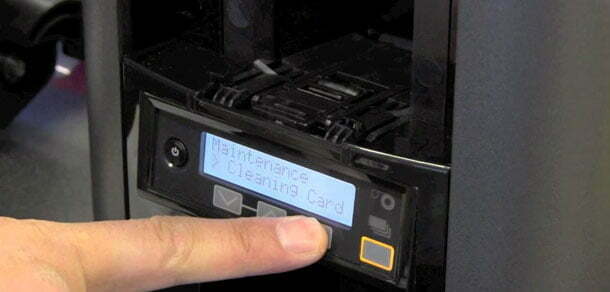
To ensure high quality printing for your IDs and to protect your card printer investment and extend its lifespan, remember three simple words: keep it clean. Basic cleaning of desktop printers is a simple, straightforward process that anyone can do with just a bit of research and a basic understanding of the printer’s components.

A card printer is a complex machine, so it should come as no surprise that routine upkeep is required. Printers contain both moving parts and sensitive, precise components that must be maintained and kept cleaned to avoid jamming, damage and reduced performance.

“We do our best to educate everyone to keep the printers clean, tuned up and use the proper supplies,” says Mark Degan, corporate marketing manager at ColorID.

The good news is that printer manufacturers have made the task of routine cleaning easy with specially designed cleaning kits. Customized kits are available for specific manufacturers and models and are typically available from printer suppliers or online retailers. A common single use kit costs around $30.

Items contained in a cleaning kit will vary based on the requirements of the specific printer but often include elongated cards or rollers with adhesive to grab dust and dirt, pens or swabs with cleaning solution, dust-free cleaning cloths and other supplies.

Instructions for cleaning specific models will vary so refer to the manual, cleaning kit inserts or search online for instructions. Additionally there are online videos demonstrating specific techniques for many makes and models. “Basic techniques are common across many units,” explains Degan.

He recommends the following schedule to keep your printer in optimal working order:

  • Internal rollers. Clean the internal rollers of your printer with an approved cleaning kit every 1,000 prints or with every second ribbon change. For most printers this is done using the elongated card with adhesive to pull debris from the rollers. Simply peel off the adhesive backing and run the card through the printer. Typically this is done via the single card feed or manual insert slot.
  • Print rollers. With every ribbon change, clean the rollers that feed cards into the printer using a water dampened lint free cloth. This is important to ensure that cards feed into the printer correctly to avoid jams and damage.
  • Print head. Using the pen or swab provided with the approved kit, carefully clean the print head each time you change the ribbon. With the ribbon removed and the print head visible, gently rub the pen or swab back and forth across the print head to remove and dust or residue. Allow the print head to dry completely before replacing the ribbon.
  • Printer body. With each ribbon change, clean the outside of your printer with the alcohol-saturated cloth included with the cleaning kit. Use a dry dust-free cloth to gently remove dust from the exposed areas inside the printer as well.

Beyond these normal cleaning processes that can safely be done on site, Degan recommends annual maintenance from a factory trained service technician as well.

“We send out reminders to our customers telling them that when they have a moment of down time, it is a good idea to get a tune up,” says Degan.

He describes ColorID’s tune-up program as, “a small investment that covers replacement parts and gives them insurance that their printer is operating at its peak.” During the tune-up, a factory-trained technician inspects, calibrates, cleans and tests the unit.

“Your campus and your students rely on the ID and that means your card office must be able to rely on the card printer,” says Degan. “The best way to ensure it is ready when you need it is to keep up with regular, scheduled cleaning and maintenance.”


Subscribe to our weekly newsletter

RECENT ARTICLES

Transact and Genea discuss their partnership for cloud-native access control in higher education
Feb 19, 26 /

Illumia and Genea partner to bring cloud-native access control to higher education

In this episode of CampusIDNews Chats, leaders from Transact + CBORD (rebranding to Illumia in March 2026), Genea, and Mercer University discuss a new partnership delivering cloud-native access control to higher education. The collaboration brings together Genea’s modern physical security solution and Illumia’s identity, credentialing, and commerce platform. Mercer is a key initial implementation of […]
Storytelling white board
Feb 17, 26 /

Shaping campus card operations into narratives that resonate with decision makers

In this episode of CampusIDNews Chats, Adam Brooks, Director of the Public Speaking Program at the University of Alabama, shares practical guidance for campus card leaders seeking to better communicate their value. His core message centers on the power of storytelling as a leadership tool. Data informs but story motivates Brooks challenges the assumption that […]
Rosty Chen, Michigan State University, video image
Feb 11, 26 / ,

Rate study reveals true cost of campus ID cards at Michigan State

In this episode of CampusIDNews Chats, Rosty Chen, ID Administrator at Michigan State University, explains how his campus card office undertook its first comprehensive rate study to ensure it was charging appropriately for student, staff, and departmental ID cards. Launching their first-ever rate study The effort began with a simple realization. “We’ve never done a […]
CIDN logo reversed
The only publication dedicated to the use of campus cards, mobile credentials, identity and security technology in the education market. CampusIDNews – formerly CR80News – has served more than 6,500 subscribers for more than two decades.
Twitter

Great inverview on the Public Key Open Credential (PKOC) standard with ELATEC's Jason Ouellette, Chairman of the Board for the @PSIAlliance.

Attn: friends in the biometrics space. Nominations close Friday for the annual Women in Biometrics Awards. Take five minutes to recognize a colleague or even yourself. http://WomenInBiometrics.com

Load More...
Contact
CampusIDNews is published by AVISIAN Publishing
315 E. Georgia St.
Tallahassee, FL 32301
www.AVISIAN.com[email protected]
Use our contact form to submit tips, corrections, or questions to our team.
©2026 CampusIDNews. All rights reserved.