Card, mobile credential, payment and security

A crash course on one of the oldest identification methods
The barcode is essentially a symbolic representation of data in machine-readable format. In other words, a barcode translates numeric and sometimes alphabetic characters into a series of black and white spaces that can be read by an electronic device. In much the same way that a computer stores data as a series of zeros and ones and a magnetic stripe stores data as a series of positive and negative charges, a barcode stores data as black and white bars.
A barcode reader, called a scanner, emits a beam of light at these bars and measures the reflection of the beam. Black areas absorb light while white areas reflect light. By monitoring this process, the scanner can accurately read the order of the black and white bars. A computer then utilizes this data for purposes of product or patron identification, inventory tracking, or other functions.
The key to the barcode lies in the standardization of the encoding/printing and reading/scanning processes. There are a number of commonly used symbologies, each having different data storage capabilities, character sets (numeric-only, alphanumeric, etc.) and common applications. Common symbologies include the UPC & EAN (Universal Product Code / European Article Number), Code 39, and Code 128. You can think of these as different typefaces.
While each symbology is unique, the conceptual process is the same. To understand this process, a breakdown of the UPC barcode is presented.
The UPC is a standard developed by the Uniform Code Commission (UCC) that is utilized to identify all products at the point-of-sale. The UPC is capable of representing numeric characters only and combines a machine-readable barcode with visible numbers that can be read by store clerks when necessary (e.g when the product doesn’t scan at the grocery store register).
Each product has a unique 12-digit UPC.
The first six digits identify the manufacture. Companies apply for a six-digit identification number that is assigned from the UCC in Dayton, Ohio. The next five digits are defined by the manufacturer and represent a specific item in the manufacturer’s product line. The final digit is a check digit that is the result of a mathematical calculation utilizing the previous 11 digits.
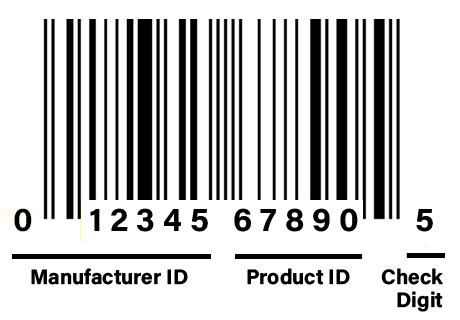 This check digit enables a scanner to conduct a basic mathematical calculation on the first 11 digits to verify the accuracy of the scan. If the calculation based on the initial digits matches the final digit, the scanner presumes that a valid reading was obtained. If not, an error message is given and the barcode must be scanned again. This is what happens when the grocery store clerk scans a product, hears the beep, and then rescans again.
In reality, even the machine-readable part of a barcode can be translated by a patient eye. Remember it is simply a series of black (B) and white (w) bars. UPC utilizes seven bars to create a single character. The pattern of these bars is the key, for example W-W-B-B-W-W-B represents the number one.
The total number of bars in a UPC barcode is 97. Because there are 12 digits and each digit has seven bars, 84 of the bars define the digits. The remaining 13 bars help the scanner to obtain accurate reads.
The first three and last three bars tell the scanner to start and end the reading. They are always B-W-B. The center point is signaled by a seven bar indicator that is always B-W-B-W-B-W-B.
Thus, the 97 bars in a UPC barcode consists of a start indicator (3 bars) + 12 characters (84 bars) + center indicator (7 bars) + end indicator (3 bars).
Though it is not easy, you can translate a barcode using only your eyes and a pencil and paper.