Card, mobile credential, payment and security

Top ways to evaluate whether your credentials are the weak link in your campus security strategy
 By Brian Marris, Product Manager, Allegion Connected Accessories
From mechanical keys to mobile devices, managing access is an essential piece of campus security. With more campuses exploring mobile credentials, buzz continues to build across the campus card industry. In response, schools are reevaluating their credential platforms alongside locks and other hardware to provide a more secure and convenient campus experience.
Don’t let credentials be the weak link in your campus security strategy or complicate your management of access. When it’s time to evaluate your campus credentials, consider these top three factors to ensure your credential is a strong link in the campus security chain:
While convenience is often a motivating factor to upgrade, the number one thing to consider is the security of the credential. Encryption is crucial because it protects the data being relayed between the credential and reader. Basically, it takes the string of numbers being communicated from the chip in the credential, shreds it apart, sends it to the reader and puts it back together—like a technologically advanced handshake.
Encryption is crucial. It takes the string of numbers being communicated from the chip in the credential, shreds it apart, sends it to the reader and puts it back together—like a technologically advanced handshake.
It’s important to understand the encryption and frequency before selecting a credential type.
For optimal security, it’s best to choose an option that has high frequency and high encryption, like smart and mobile credential technologies. In addition, for those currently using proximity and magstripe solutions, a transition plan to move to a secure smart or mobile credential should be strongly considered.
Almost as important as security is the interoperability of the credential. Smart and mobile credentials can have limited interoperability depending on the platform selected and may limit the available hardware options. This can be overcome, but it’s important to think about the encryption methodologies and platforms that you choose. One of the first questions you should ask is if the credential platform was built on an industry standard, open technology like NXP, or is it a propriety technology that is exclusive to one or two companies.
Open platforms allow the end user to be the center of the solution and leverage a smart credential to work across different pieces of hardware and with a variety of applications.
Open platforms allow the end user to be the center of the solution and leverage a smart credential to work across different pieces of hardware and with a variety of applications. Closed options are much more restricting. A proprietary solution can lock you in to ordering very specific hardware because the technology isn’t widely known or shared, and therefore cannot be supported. Leveraging an open platform protects your freedom to choose the technologies and manufacturers your college wants to work with – putting security choices and long-term financial independence in your hands.
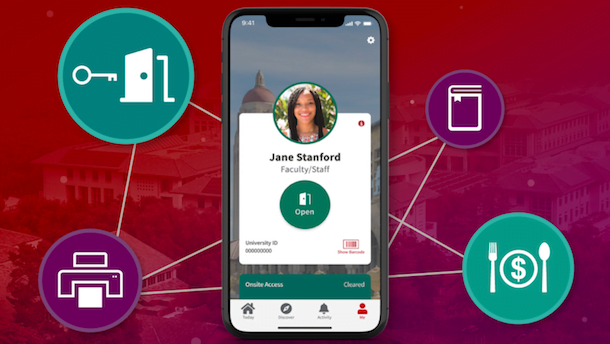
It is equally important to think beyond access control so the credential can be leveraged for more. Consider all the places around campus where students would benefit from using their campus ID – vending, bookstores, dining and transportation. If the correct technology is chosen, a student can carry one credential to accomplish everything.
Lastly, an open platform provides flexibility as you think about your future. Using an open platform gives a university flexibility to keep, change or add different brands, products and technologies as they become available.
When implementing various systems or switching to smart or mobile credentials, it’s important to take into account what others on your campus are doing. With a variety of decision makers across campus, it’s important to assure everyone is on the same page. Implementing one head-end access control system is beneficial. There are integrations that need to occur to ensure all the pieces of the puzzle work seamlessly. Consider all the places around campus where students would benefit from using their campus ID— including the different schools, student housing, printing, transportation and more.
The system, hardware and credential all need to work together. And when you add in other pieces like payment, there’s additional coordination needed. Therefore, it’s important to collaborate with multiple departments across the university before implementing new credentials or other hardware.
Research your options and work with trusted, verified manufacturers or wholesalers. They can help navigate the options in the market to ensure you’re getting an industry-known technology that will meet your college’s security needs.
Upgrading to a smart or mobile solution that’s encrypted is the best defense against stolen information. Mobile is the credential of choice because students are far less likely to loan someone their phone versus their campus ID card.
Interoperability plays a big role. A closed or proprietary solution limits your power to adopt new technologies as they are available in the market.
Preparing for the future also is important. Think about where the campus should be in five and ten years. When it’s time for new hardware, consider products that will allow the school to move from current state to future state. Whether you have mechanical, proximity or smart cards, resist installing hardware that isn’t open to new technologies like mobile. There are a variety of ways to future-proof door hardware so that new technology is easier to adopt, like multi-technology readers and credentials.
Interoperability plays a big role here. A closed or proprietary solution limits your power to adopt new technologies as they are available in the market. Instead, opt for an open product that’s more likely to work with new technological advancements in access control.
When it’s time to evaluate your campus credentials, remember to think big picture. Some universities want the convenience of a keyless campus and opt for electronic access control and smart credentials at every opening. Other schools might only be able to upgrade high security openings and building perimeter openings at first.
Regardless of your current situation, think about the future. Select solutions that give you the convenience to make security decision based on your campus’s unique needs and evolve as those needs change.
Credential security is essential to campus protection. Partner with an expert who can guide you through the various frequency and encryption options available and recommend solutions that fit your campus’s unique security needs—today and in the future.