Card, mobile credential, payment and security
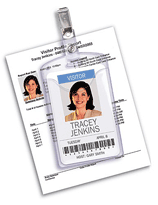 If you’re looking to get a better handle on visitors or other guests to your campus or facility, Avery may have just the solution for you. Not only will its badge and ID creation software track all your visitors with an optional barcode, it also provides good-looking badges, complete with the visitor’s color photo, plus a digital log of all visitors.
The fact is that even organizations using top of line identification cards and processes for regular populations, often use lax processes for visitors. A non-personalized “Guest” badge and a paper sign-in sheet are weak indicators of a person’s right to access a secure location. Yet, the effort and expense required to provide the full-blown ID badge to temporary users is often too much. This system fits squarely in between these two scenarios—providing enhanced authentication and security in a cost effective easy to use system.
“We’ve been extremely successful with our temporary ID cards,” said Adam Bratter, group product manager for Avery Dennison Office Products, Photo ID Systems, Brea, Calif. “It’s exciting to talk to end users who have used it.”
The Avery Dennison software system prints ID cards on a variety of different paper stocks, such as name badge labels and badges that can fit into plastic badge holders, said Mr. Bratter. There’s also a third type, a self-laminated ID badge that doesn’t require a heat laminator. “You print the card, lift it from the printed sheet and you fold the self-adhesive lamination over the badge,” added Mr. Bratter.
“The software will run on standard PCs using Windows XP or Windows 2000 (see below for complete requirements.) You can use any standard Deskjet or laser printer, or an inkjet if you want color,” added Mr. Bratter. Photos are captured by a simple web camera.
If you want to keep track of visitors, barcode-affixed badges can be printed. “This allows you to have the visitor scan out, so you’ll need a barcode scanner,” said the product manager.
“We actually do sell a complete system kit, which includes software, camera, barcode scanner, the mini tripod for the camera and a USB hub to hook it all together,” he said. “The complete kit sells for $995. Or the software can be bought separately for $375.”
The software, he said, includes over 50 templates designed not just for visitor badges, but also for events and long-term IDs.
“We want to make sure it’s appropriate for the needs of the organization. It’s simple paper-based ID badges with the ability to print bar codes. It’s a very simple solution, very basic,” added Mr. Bratter.
It takes users an average of 45 minutes to install and set-up the system for use, even less for training–about ten minutes, said Mr. Bratter, adding “one of the key benefits is that the software is easy to use.”
Another key benefit is the elimination of easily forged paper visitor logs. They are difficult to archive and if you need to know a specific time and day that a person was on campus or in your company building, a it can take hours of searching, explained Mr. Bratter. “Our system maintains a digital log. This way you know who has been on your campus and when; and can search the digital record quickly.”
The software provides the ability to issue single day badges. “The next day, if that person comes back with the same badge, you’ll know the badge has expired,” said Mr. Bratter. “But you can also issue multi-day badges. And all badges, if they have a barcode printed on them, will allow visitors to scan in and scan out.”
The company is now getting ready for the ASIS show Sept. 27-30, in Dallas, Tex., where it will introduce version 2.0 of the Photo ID software.
“The first thing we’ll be adding is a card reader to the system that can read driver’s license and business cards to auto-populate the fields on the id badge,” said Mr. Bratter. “Another new feature is list import that allows you to import names and visitor information (from external sources). That’s helpful for large events because it will allow you to import names ahead of time. We’ll also be introducing two new lines of our ID badges,” he added.
Another announcement at the show will be that the templates to print blank Avery Photo ID Badges will be available in a number of Avery’s alliance partner’s software products later this year. These partners, said Mr. Bratter, include companies that produce electronic visitor management software and electronic access control software.
Sold through dealers, the software was launched last September. “You can buy it from a security products dealer or from a commercial office products dealer,” he said.
Click on the ad to take a very cool online tour of the Avery Photo ID system:
Minimum system requirements for the Avery Photo ID system: