Card, mobile credential, payment and security
For higher education institutions, managing access to thousands of doors across campuses has always been a daunting task. Universities often have 1,000, 5,000, 10,000 or more access control readers. For full visibility into the environment, each access point requires detailed tracking of location, hardware, firmware versions, and maintenance needs.
ASSA ABLOY’s Openings Studio is designed to streamline this process, enabling universities to manage their access control systems more efficiently and plan for the future.
To better understand how Openings Studio works and the benefits it can deliver for campus card and security operations, CampusIDNews spoke with Ryan McLachlan, Senior Director of Openings Studio Building Technologies at ASSA ABLOY, and Jeff Rindlisbacher, Director of the same division.
When managing their physical access systems, universities face a complex web of data points. Every component requires careful documentation, from wireless locks and readers to physical door components like strikes and frames. But for most organizations, this documentation is fragmented at best.
If there’s an issue at a door – say a card isn’t working – you already have detailed information before sending someone out. That way, you’re not wasting time on a separate trip just to assess the situation.
According to McLachlan there is enormous value in creating a centralized database to track these assets.
While Openings Studio is ideal for managing data for door access points, it was not designed to support other security infrastructure such as cameras, intrusion, panic or duress systems. Another solution called SiteOwl, however, is designed to capture all this additional component data. ASSA ABLOY acquired SiteOwl to complement its Openings Studio solution. Learn more about SiteOwl here.
“Being able to document all of your existing security devices is critical,” he says. “Openings Studio has always been strong on door-centric applications, giving you the ability to collect and manage opening data at a detailed level.”
It goes beyond simple documentation by providing actionable data. Campuses can leverage the platform to align future projects with existing infrastructure, ensuring they make informed decisions about replacements and enhancements.
“It’s all about understanding what’s in the field and where it’s at from a lifecycle perspective,” he explains. “It lets you intelligently plan for upgrades or for bringing new buildings online.”
Openings Studio is a web-based platform with mobile capabilities, making it accessible to teams both on-site and in the field. Field staff can use tablets or smartphones to gather data during site visits, conduct inspections, or troubleshoot issues in real time.
This functionality is beneficial when responding to maintenance calls. Before dispatching a technician, the system provides a complete record of the affected door, ensuring the right tools and parts are brought to the job.
NFC chips or QR codes are attached to doors during installation, upgrades, or as a part of the cataloging process. Scanning these tags reveals key information like the building location, hardware set, and access credentials.
“If there’s an issue at a door – say a card isn’t working – you already have detailed information before sending someone out,” McLachlan explains. “That way, you’re not wasting time on a separate trip just to assess the situation.”
The platform integrates smart tags, such as NFC chips or QR codes, that are attached to doors during installation, upgrades, or as a part of the cataloging process. Scanning these tags reveals key information like the building location, hardware set, and access credentials. Users with higher permissions can even view detailed work history, specifications, and even installation or programming instructions directly from the mobile app.
According to Rindlisbacher, this feature reduces confusion and accelerates problem resolution.
“All the collateral is there at your fingertips,” he says. “It’s about having everything you need in one place, whether you’re maintaining existing doors or working on new construction.”
For campuses migrating to mobile access, Openings Studio provides a perfect opportunity to capture and organize data during the process.
“Large-scale initiatives like a mobile credential rollout are the ideal time to begin collecting detailed door data,” McLachlan explains. “Since you’re already visiting every reader, it makes perfect sense to capture that information in the most organized way possible.”
Universities can create custom inspection templates within the software to track pilot programs or test specific hardware. For example, a school might add fields to confirm whether a door successfully reads the new mobile credentials. This data is easily reportable and can help administrators identify problem areas before a full-scale launch.
Large-scale initiatives like a mobile credential rollout are the ideal time to begin collecting detailed door data. Since you’re already visiting every reader, it makes perfect sense to capture that information in the most organized way possible.”
Even when teams are on-site for a specific project, they can take more time and gather additional valuable data.
“It might start with a rekeying initiative, but while we’re there, we can capture information about fire-rated openings, card readers, and more,” Rindlisbacher says. “That extra data benefits other departments down the road.”
The platform also simplifies project tracking for construction and renovation efforts. The project team can monitor whether hardware has been delivered, installed, and quality-checked before final turnover. By providing transparency across stakeholders – from architects to general contractors to university security teams – Openings Studio can ease the workflow from start to finish.
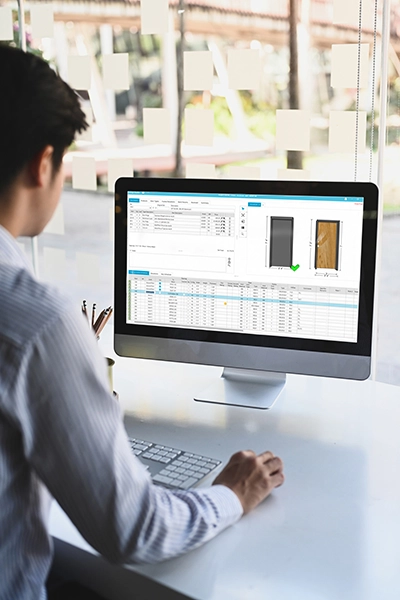
Universities can use Openings Studio independently or have ASSA ABLOY’s consulting team test credentials and document the components and status of every door and reader
The platform’s non-proprietary database supports hardware from multiple manufacturers, making it flexible for campuses with diverse systems. It also integrates with popular building design solutions, ensuring seamless collaboration between architects, contractors, and campus security teams.
While universities can use Openings Studio independently, many choose to bring in ASSA ABLOY’s consulting teams for large-scale projects. These specialists conduct conditional assessments, test credentials, and document the components and status of every physical opening and access device. For campuses with limited staff, outsourcing this work ensures accuracy and reduces the burden on internal teams.
McLachlan emphasizes that successful implementations require thinking beyond immediate needs.
“There’s often one initiative driving the project, but we always look for additional valuable data points while we’re in the field,” he said. “It’s about planning ahead and understanding the full lifecycle of your security systems.”
Managing thousands of doors and access control devices is challenging for any university, but Openings Studio offers a comprehensive, scalable solution to facilitate the process. By centralizing data, streamlining maintenance, and supporting future initiatives like mobile credential migrations, the platform empowers campus card and security teams to work smarter and more efficiently.
“Ultimately, it’s about providing transparency and future-proofing your operations,” McLachlan concludes. “When you have the right data at your fingertips, you can make better decisions and ensure your campus is ready for whatever comes next.”
Washington State University (WSU) has transformed how students regain access to their residence halls when they’ve lost their campus card. A network of self-service kiosks designed to issue temporary cards provides a way to solve late-night access problems and ease the associated burden on staff.
“Our temporary campus card system started originally as a 24/7 self-service system for students to help them get into their res halls when we're not staffing them 24/7 with RAs,” explains Aly Heinrich, Manager of WSU’s CougarCard program. “Before the kiosks, campus staff were fielding calls at all hours from students who had lost their cards or were locked out with no RA available to help.”
By providing 24/7 access, WSU significantly reduces the need for RA staffing hours, eliminating an estimated 33,000 hours and the associate payroll.
Currently, there are kiosks in seven of the university’s 14 residence halls, with plans to expand to every hall. This will eliminate the challenge of students having to access another residence hall to get a temporary card to use in their own hall.
The kiosks issue simple, low-cost prox cards.
Students log in with their campus credentials, and the system deactivates their regular card while the temporary card is active. Each temporary card is valid for three days and comes with a $20 charge – the same amount as the normal replacement card fee. If the card is returned within two weeks, the fee is automatically refunded.
When finished, students return the card to the kiosk, which immediately makes it available for another user. WSU has about 2,000 cards in circulation, constantly being checked out and recycled.
“It gets used constantly. I checked our temp card data, and a hundred cards have been taken out since I left four days ago.”
“Just today, I checked our temp card data, and a hundred cards have been taken out since I left four days ago,” she says. “It gets used constantly.”
The benefits go beyond student convenience. By providing 24/7 access, WSU significantly reduces the need for RA staffing hours. Heinrich estimates this saves an estimated 33,600 hours of work per year, which even at minimum wage is a significant sum.
Looking ahead, she sees continued value for the system, even as mobile credentials gain popularity. As she explains, there’s still going to be times when students don’t have their phone handy and this can give them a quick, easy way to get back into their room.
To listen to the full interview, click the image at the top of this page.
TRANSCRIPT
Our temporary campus card system started originally as a 24-7 self-service system for students to help them get into their res halls when we're not staffing them 24-7 with RAs.
The problem that it was solving was our office was getting calls in the middle of the night asking, hey, my card's not working, I can't get in my dorm room, what am I supposed to do? There's no RA here.
So we installed temporary card kiosks in seven of our 14 res halls and now students have a 24-7 solution to get into their dorms.
We currently have seven kiosks in seven of our 14 res halls, but we are working on installing a kiosk in every single residence hall on campus.
We run into some students not being able to get into a different residence hall to get into a kiosk, so we're going to eliminate that problem and help them get into their res halls whenever they need.
Currently we are producing only prox cards in the temporary card kiosks.
It's cheap. It's simple.
There's not a huge security concern because they already have to log in with their own campus credentials to get a temporary card.
That temporary card only lasts for three days. It will deactivate their entire campus card account. That way they either have to come get a new campus card or they have to get a new temporary card.
When they're done with the card, the kiosks have an acceptor so they can just log into the kiosk and return their card, and they can actually reactivate their current card as well.
When a student checks out a temporary card, it puts a $20 charge on their account. Our card replacement fee is $20, but if they return that card within a two week period, the refund is automatically applied.
We use Meridian kiosks. They are mostly a hospitality food service kiosk industry, but they've produced a really fantastic piece of hardware for us.
Originally when we were using these kiosks also as card replacement systems, inside of the kiosks we had a card printer, we had a full desktop computer and everything.
Now our kiosk just has the card acceptor, the card dispenser, and the computer in there to manage the computer software system.
Just today actually, I checked our temp card data while I had a break and a hundred extra cards have been taken out since I left four days ago, so it gets used constantly.
We have about 2,000 temporary cards in production that are in recycling mode, so as soon as a student returns a temporary card to a kiosk, it's automatically removed from their account and another student can go and take that and apply it to their account instead.
Our feedback has been awesome.
We thought this might be a cool thing 15 years ago and my team has seen students asking for it more.
Even this year with a student over winter break not being able to get a temporary card because she didn't live in a hall with a kiosk – we heard that and we're going to put a kiosk in every hall now.
It started mostly as student service, but it also really helps our housing department not have to pay their RAs 12 hours a day.
Imagine 14 residence halls, one RA 12 hours a day, that's 14 times 12, times your minimum wage, we saved 33,600 hours of RA work in one year.
So multiply that by your minimum wage and that's how much money we saved.
I was presenting this project to NACCU at this conference and I let the audience know that honestly with all this talk of mobile credential, I get a little nervous that this temporary card system might die off.
It might not be needed if everybody has their phone, but they actually reassured me.
They were like, how many times do you leave your phone in your car when you're packing in your groceries. You get up to your door with your arms full of groceries and you don't have your phone, they would have to drop all their groceries, go all the way back to their car and find their phone.
Now there's a kiosk right down the hall so they can just put their groceries down for a second, go get a card, get in their room, put away the groceries and go get their phone.
As much as I was concerned about it at the beginning of this week, the folks here have really helped me feel a lot better about it, and they showed a lot of interest as well.
So it's been really cool to see the value that this provides for our students and that there is a future with it as well.
It was 20 years ago when Hurricane Katrina hit the Gulf Coast, devastating cities and towns across Louisiana and Mississippi. Nearly 1400 people lost their lives and – adjusted for inflation – it remains the most costly hurricane in U.S. history.
For countless families and individuals, life was changed forever, and negative impacts are still close at hand. But occasionally instances of good come out of even the worst events.
Such was the case when a student ID card that was lost during the storm was returned to its owner at Katrina’s twentieth anniversary.
Driven to solve the mystery, Copeland posted a photo on the high school’s alumni page. It did not take long for people to respond.
While walking a stretch of beach at Gulf Islands National Seashore, park ranger Becky Copeland spotted something in the sand. She unearthed a small piece of history — a beaten but intact student ID card buried below the surface.
"It was so dark and weathered, but still intact," Copeland says during an interview with CBC Radio's As It Happens.
At first, the card seemed like just another item for her collection of unusual finds such as messages in bottles. The only visible clues were the year 1969 and the name of a high school in Birmingham, Alabama.
Unfortunately, the name of the cardholder was no longer visible so Copeland assumed its owner would forever remain a mystery. But recently, while rearranging her collection, she was stunned to see the faded lettering had become legible.
The card belonged to Cathy Hamel, who graduated in 1973.
Driven to solve the mystery, Copeland posted a photo on the high school’s alumni page. It did not take long for people who knew Hamel to respond.
From Katrina’s fury to a heartfelt reunion
Hamel had moved to a small town on the Mississippi coast years before Hurricane Katrina washed away the entire community. The night before the storm, she evacuated to house further inland, but even there the storm surge reached her in the attic. Thankfully, she made it through.
When she returned the following day, her home was completely gone — reduced to a concrete slab and a porch swing hanging from a tree. The few belongings she saved were two photo albums and some insurance papers.
But two decades later, her student ID card that had been lost to the storm resurfaced.
The beachcombing park ranger, Copeland met Hamel at the Gulf Islands National Seashore visitor center, and they embraced immediately.
Hamel called Copeland an angel, “because she did all the legwork to find me to return it."
For Hamel, the recovered ID is far more than a plastic card – it’s a tangible reminder of resilience, loss, and the kindness of strangers.
In this episode of CampusIDNews Chats, Tony Erskine, Founder and CTO of CloudCard, shares how the company’s Remote Photo solution simplifies the process of student ID photo submission. Since its start in 2015, the company has grown into a widely adopted mainstay across higher education, working with all major one card providers.
We’re making it feel like magical photo elves took a picture of your student for you and then dropped it into your one card system.
“Basically, we’re trying to make it feel like magical photo elves went and took a picture of your student for you and then dropped it into your one card system,” says Erskine.
Remote Photo eliminates the need for students to visit the card office, instead allowing them to upload pictures through a streamlined, AI-enhanced workflow. The system automatically removes backgrounds, enforces consistent sizing, and prompts students to resubmit photos if they don’t meet requirements.
When CloudCard first launched, every student photo had to be moderated manually. But as AI technology evolved, the company integrated automated classifiers to approve or reject submissions. Today, a photo goes through about two-dozen classifiers or checks prior to approval.
Some institutions rely fully on automation, while others keep human review in place.
“The students don’t always read, and that’s okay because I don’t always read,” Erskine jokes, highlighting how the system helps students correct mistakes without slowing down the process.
Beyond photos, Remote Photo now supports government-issued ID verification. Students can upload a passport or driver’s license alongside their ID photo, and CloudCard’s system uses facial recognition and optical character recognition (OCR) to confirm identity details. This reduces the burden on card office staff and eliminates the need for in-person verification.
By blending automation with flexibility, Remote Photo not only saves staff time but also meets students where they are—online, mobile, and expecting convenience.
To watch the full interview, click on the image at the top of this page.
I'm Tony from Remote Photo by Cloudcard and we are an online photo submission system that got its start out of Liberty University where I built their system in 2014.
In 2015 we launched right here in NACCU, so it's actually our 10 year anniversary coming to NACU and kind of like a homecoming.
So what do we do?
We capture photos, we make it so that the students don't have to come into the card office at all, especially when you compare it with mobile credentials or something like that.
We provide an AI-enabled workflow because to be honest students always don't always take the best photos, right? So, we'll remove background, we'll crop it, consistent aspect ratio and size and all of that.
And then on top of that we tell them when they do things wrong. Because you know what? The students don't always read and that's okay because I don't always read.
We don't hold them to that. We just tell them we can't take that photo and then we make them take another one.
Basically we're trying to make it feel like magical photo elves went and took a picture of your student for you and then dropped it into your one card system.
We started pretty small back in 2015 with three customers. So, a quick shout out to Pacific, ODU and Mercer University who took a chance on us early on which is super awesome.
And now we are, gosh we've partnered with pretty much all the one card systems. It doesn't really matter who you're working with or what you're doing.
We're kind of the standard for online photo submission in higher ed and it's really great to be here at NACCU and working with all our great partners.
Early on when we built the first iteration of the system, every single photo had to be moderated by a human being, and as we got into the 20-teens computer vision was coming along. In 2017 we built as far as I know the first ID photo classifier where we were able to look at a photo and say yeah this photo belongs on an ID card or no it doesn't.
That has allowed many of our institutions to completely delegate that to what we call “Helper Robot” because you know he's kind of helpful. We've added on to that over the years so we've gone from a single classifier to right now there's there are probably two dozen smart filters that a photo passes through on its way through the workflow.
Some of them will auto deny some of them will auto approve but some of our customers still look at every photo because that's what works for their workflow and that's totally cool.
Speaking of AI, we are now able to take a government issued ID like a passport or driver's license, and we can accept that at the same time we accept their ID photo. Then we do facial recognition, and we do optical character recognition to read the driver's license. We compare their name or their address or whatever it is that you want us to check for on the ID.
Again it allows you to offload some of the work that was previously done by a human where now they don't even need to come in for you to verify their ID. It's really helped out a lot.
If you're interested in learning more about Remote Photo or if it seems like it might be a fit for your organization, you can check us out online. The first step would be for us to schedule a quick 15-minute call to see if there's a fit and if there are problems that we can help you solve. We'd love to talk with you.
In the second article in our series titled Chips, formats, and encryption – we explore card formats. In the previous article, we learned that chips store and process data, but it is the format that defines the specifics of the data – the number of digits in the string and what each area of the string means.
Consider this series of digits, 2024567041. Now look at it this way, (202) 456-7041. An established format defines that a phone number will include ten digits with the first three standardized as the area code.
The format provides order, but the format is not the actual number. That unique number identifies – or dials – the White House.
Similarly, a format defines the way data is stored on the credential, but each cardholder has a unique number.
You often hear an end user say ‘I have a 35-bit card,’ but they are confusing the 35-bit format with the card or chip itself.
For identity and access control professionals, the differences between chips, cards, formats, and numbers are subtle. They are, however, crucial to managing systems.
Understanding the options within each category can ensure you make the most appropriate selections for your campus. It is also crucial in ongoing purchasing processes to make sure you are specifying cards, formats, and numbers that will work in your environment.
Each concept is applicable to both cards and mobile credentials, and understanding them is key to making informed decisions for your campus card program.
“It is always a challenge to explain to customers the difference,” says Todd Brooks, Vice President of Products and Technology at ColorID. “You hear ‘I have a 35-bit card,’ but they are confusing the 35-bit format with the card or chip itself.”
He explains that the same format can be used on any card type, because the format is just the way the data is parsed.
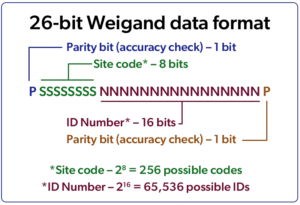
The 26-bit format – also known as the Weigand format – is the oldest and most common. It allows for the smallest number of digits, however, and this provides limitations.
A bit is a binary term for a zero or a one. Thus, 26-bit format consists of 26 zeros or ones laid out in a specific pattern. The initial bits form the three-digit site code with 256 total options. The remaining bits form the ID number with 65,536 options.
The initial bits form the three-digit site code with 256 total options. With that limited number of unique codes for organizations worldwide, there are plenty of duplicates.
The limitation is that with only 256 site codes for organizations around the world, there are plenty of duplicates. While 65,536 seems like a lot of unique numbers, many organizations have thousands of cardholders.
Any card reseller worldwide can issue 26-bit cards so there is no control over numbering systems.
“Because 26-bit is an open protocol, no entity is managing the number range so if care is not taken when placing orders, programmed ID numbers can overlap from one order to the next,” says David Stallsmith, ColorID’s Director of Product Management. “If this occurs, the new batch of cards cannot be entered into your system because the numbers are already in use.”
 Moving beyond 26-bit
Despite the industry’s concerns, the 26-bit ‘OG’ format remains difficult to displace.
“It works in everybody's system, and some older access control systems can only handle 26-bit,” says Stallsmith. “Even when systems support longer formats, many security managers are reluctant to use them.”
But he stresses that upgrading to more versatile formats makes sense. That is why security-conscious organizations have moved beyond 26-bit.
We highly recommend against starting with a 26-bit format. HID and Allegion offer formats of 35-bit, 40-bit, 48-bit, and they will manage the number range for you.
“We highly recommend against starting with a 26-bit format,” Stallsmith says. “HID and Allegion offer formats of 35-bit, 40-bit, 48-bit, and they will manage the number range for each customer which is a nice feature.”
The longer the bit structure, the more digits can be stored. The more digits, the more uniqueness for site codes and credential numbers. This is crucial to the successful operation of all the systems that use cards to authenticate and grant access, but it is not the same as data security.
“True security is in the chip and encryption, not in the format,” says ColorID’s Brooks.
There are thousands of other formats, but many are custom and can only be purchased from specific dealers. In some cases, manufacturers will create one for a specific dealer, and they will only supply cards with the format to that dealer.
Dealers often claim that it provides an added layer of security, allowing them to further tighten the grip against card number duplication.
Stallsmith says that this added layer does little to nothing for security, and it forces the end customer to buy all cards through the dealer.
“The real security here is protecting the dealer's business,” jokes Stallsmith. “Make sure you're buying a format that's generally available from all dealers who sell that product.”
Since most campus cards are used in access control systems, they typically use one of the formats described above. In addition to the unique ID number required for the security system, however, the same card will often need to contain one or more additional unique IDs.
A common ID number that is used by the institution’s campus card system provider is a 16-digit ISO number. Additionally, dedicated user IDs for applications like library checkout are sometimes used.
If you are planning to move to mobile, find out from your intended provider what formats they support and consider migrating your card population to that format.
“In some cases, the access and campus card systems themselves are modified to support a single ID that is stored on the card using a single format,” explains Brooks. “But in other cases, the card contains multiple numbers, each designed to support specific functions.”
Modern, multi-application contactless cards are built to support this exact situation. Multiple numbers can be stored in the same contactless card, and each can use a different format.
Though it is not always the case, most modern access control systems can support multiple formats.
But, as Stallsmith explains, end users typically prefer all their credential types to be programmed with the same format.
“If you are planning to move to mobile, find out from your intended provider what formats they support for issuing mobile credentials,” he says. “And consider migrating your card population to that format.”
Three main components underlie modern credential technology – chips, formats, and encryption. Each are applicable to both cards and mobile credentials and understanding them is key to making informed decisions for your campus card program.
Each concept is applicable to both cards and mobile credentials, and understanding them is key to making informed decisions for your campus card program.
In this series of articles, we will dive into each component, but first a brief preview.
Chips are the core of the credential equation. Like the chips that power almost everything we use in our modern lives, they both store and process the data required for identity transactions.
A format – also known as a card format or data format – is the standardized pattern used to store data on a chip. The format holds information such as ID numbers that allow access control and other systems to make decisions about the cardholder. Because data formats are just patterns or structures, they can be used on different chips. This enables different chip types to be used in the same system.
Encryption is the primary method used to secure data on the chip and in transit between the chip, reader, and system. Encryption levels in credentials vary greatly, from none-at-all to best-in-class, and everywhere in between.
In this first of these three articles, we’ll dive into chips.
Most chips on ID cards are either proximity chips that operate at the 125 kHz frequency or contactless smart chips that operate at the higher 13.56 MHz frequency.
The chips used in proximity or prox cards are older, non-secure technology. They do not support encryption and are really a storage mechanism to hold data such as an ID number. Because they lack security, they are extremely easy to clone and thus have fallen out of favor for secure applications like campus credentials.
You can go to a kiosk at Bed Bath & Beyond, insert your prox card or key fob, and they'll give you a duplicate of it.
According to Todd Brooks, Vice President of Products and Technology at ColorID, prox card cloning is easy and inexpensive due to the lack of encryption. There are vending machines and online devices that facilitate cloning.
“You can go to a kiosk at Bed Bath & Beyond, insert your prox card or key fob, and they'll give you a duplicate of it,” says Brooks. “Or you can buy a $25 device on Amazon that can clone cards very easily.”
For these reasons, higher education and most other security-conscious organizations have moved on to high-frequency 13.56 MHz contactless or Near Field Communication (NFC) technology.
But just because these chips operate at a higher frequency doesn't make them inherently more secure. It's what you do with it.
“A lot of people think, oh, it's contactless or NFC, so it's secure,” says David Stallsmith, Director of Product Management for ColorID. “But NFC only defines the communication frequency and a couple other very simple parameters. If it's not encrypted, it's still not much better than prox.”
In practice, however, most implementations of contactless chips do incorporate encryption. Of course, some do it better than others.
Common 13.56 MHz chips include MIFARE Classic and MIFARE DESFire from NXP, iCLASS from HID, and FeliCa from Sony.
Encryption for MIFARE Classic was compromised years ago, so that chip is not used often in secure applications, though it is still common in low-security situations.
For campus cards in the U.S., FeliCa and the initial versions of iCLASS were popular options, but they are not used much for new implementations. Many institutions that deployed them in the past, however, continue to use them.
There have been four versions of DESFire since its introduction in 2002. Today’s gold standard for security is EV3.
iCLASS Seos – the latest version of HID’s iCLASS – is extremely secure, and its usage is rising rapidly, says Stallsmith. While in this case Seos is the name of a specific chip, it can also be a secure identity object that can be used on other chips.
In recent years, DESFire has been the go-to for campuses and other markets seeking a secure credential.
There have been four versions of DESFire since its introduction in 2002. DESFire, DESFire EV1, DESFire EV2, and DESFire EV3.
According to Brooks, today’s gold standard for security is EV3.
The original DESFire product was phased out by NXP years ago, and EV2 was phased out more recently as NXP released the successor EV3 chip.
Because of its widespread use, EV1 is still available, though its phase out is also starting.
“EV1 still uses high-end AES encryption,” says Brooks. “It hasn't been broken, but we're just seeing NXP starting to phase it out.”
That leaves EV3 as the clear leader for new implementations.
“Many of our campus clients opt for EV3, and that is what we’ve been recommending for some time now,” says Stallsmith. “Because it was designed for backwards compatibility, it can even be blended into existing implementations that utilize prior DESFire versions.”
The other key component with chips is memory size. The larger the non-volatile memory, the more data and applications the chip can hold. DESFire EV3 chips are available in 2k, 4k, 8k, an 16k sizes.
iCLASS Seos chips are available in 8K and 16K.
Often you will hear the terms like 26-bit and 32-bit discussed when talking about contactless cards, but don’t confuse this with a chip’s memory size. These terms refer to data formats, the topic for the next article in this series.
Obviously, older less secure technology is going to be less expensive, but there are also large variances in the quality of a card’s manufacture.
It follows then that low-quality prox and MIFARE Classic cards are typically the least expensive, often just a couple bucks. But high-quality cards with the same chip can be significantly more expensive.
With any card, however, when it comes to longevity, durability, and good-looking printing, you get what you pay for.
Because of their low cost, many organizations still use non-secure prox and MIFARE Classic cards. Some are not aware of the security vulnerabilities and others choose to take the risk. If the use cases for the card are not high risk in nature, it can be a sensible decision.
With any card, however, when it comes to longevity, durability, and good-looking printing, Brooks says you get what you pay for.
“You can find inexpensive high-frequency cards, but you can also get cards – depending on what you've done with them – that are $10,” he adds. “So, there's a huge range in what you can get from high frequency.”
Here’s what campus card and security personnel should remember about chips for ID cards.
Palm Beach State College’s campus card office has opted to forego mobile credentials and stick with their longtime magstripe cards. While the decision may seem unusual to some, Jessica Bender, the college’s auxiliary services manager, explains to CampusIDNews the rationale and the research that went into it.
With a student population of 40,000, the college would face significant costs in transitioning to mobile, including annual licensing fees of $2 to $5 per credential. This compares to a onetime cost of just 25 cents per magstripe card.
She emphasizes that as a commuter-based community college, students don’t use their ID cards daily.
I don't think our students suffer by us not going mobile. As a community college, I'm not sure that they even know about it.
Most ID usage is tied to periodic events such as printing, financial aid transactions at the bookstore, or accessing the wellness center. They don’t have door access or meal plans that typically justify mobile adoption.
The average student age is between 23 and 26, and most live in the surrounding community.
If the college expands door access requirements to all students, the cost-benefit equation could shift. Then, Bender says, they would be open to reconsidering the decision.
She stresses that implementing mobile credentials should not be driven by trends. Incorporate careful evaluation of infrastructure, budget models, and long-term costs – including lost revenue from card replacements.
To watch the full interview, click the image at the top of this page.
Transcript
Our college has decided right now not to go mobile. One of the reasons is we're a very large community college and our use case doesn't really lend itself to mobile.
We have about 40,000 students, and we're still using magstripe cards. The cost is 25 cents a card.
To move to the mobile is a huge cost. We're carding 40,000 students. You have $2 to $5 annual cost per mobile.
We're not doing door access. We're not doing meal plans. We're doing mostly just stored value. So, for now, the magstripe works for us. That's why we decided no mobile for now.
I don't think our students suffer by us not going mobile.
Being a community college, I'm not sure that our students even know about it.
I hear the story that mobile makes the student decide whether they go to college A or college B. It gets a little bit different in the community college market because students stay near home to go to college.
Our students are not 18 to 21-year-olds. They're 23 to 26-year-old average.
I don't think that our students are suffering because we haven't gone mobile.
As a community college, we are all commuters, meaning we don’t have the residence halls so students don't need their card every day.
You know, I hear universities say that's why they found mobile because students always have their phone.
At a community college, the things students need their card for like printing, so you're not doing that every day. Financial aid at the bookstore, that's a semester thing. They want to maybe go to wellness center, so they need their card for that.
But it's not like a residential campus where you constantly need to present the credential.
I think that you really have to look at your use case to see if that makes sense.
That's funny that you should bring up when we might consider mobile. I was just in a meeting last week and we're slowly moving towards door access for our academic buildings. I was told by our chief safety officer that her goal is to have everything locked down 24x7.
And what that would mean would be someone would have to have a credential to present to get into buildings.
Right now we are using a MIFARE card for certain staff to have a limited amount of door access. But if you turned around and told me that from now on, every student was going to need to get that MIFARE card, so now you're at that same kind of price point at $5.
If that's where we get to, then I would say at that point that would change the conversation. Because you can save some costs by eliminating printers, eliminating staff at the printing locations, and still, you're going to be spending $5 on a MIFARE card. So I could spend $2 to $5 on the licensing for the mobile.
I just think when making a decision about mobile, it's a case by case decision and every school is going to be different.
I think some schools went with it because it was the cool, shiny thing to do, but I think you have to think about it.
Coming to things like NACCU and reading up on the industry, can help you understand all the costs involved.
Yes, the shiny new thing, but what I didn't know until I talked to a school that went mobile is it's an ongoing annual cost.
You have to have the infrastructure and the budget model to support that, and then you lose some income.
You lose your replacement fees and things like that, so you really need to make an informed decision and get all the facts before you decide, well, I'm going to do the shiny thing by going mobile.
Genea is a cloud-based smart building security provider that recently entered the higher education market via a partnership with Transact+CBORD. CampusIDNews talked with the company’s President and CEO Michael Wong to learn about the company and its offerings.
Though new to this market, Genea has deep roots in corporate security with major customers such as Target Corporation. Target uses the Genea platform across 18 countries and 1500 locations.
According to Wong, when Transact+CBORD was seeking a replacement to its on-prem TS Access solution, they selected Genea as a best-in-class cloud solution.
Most enterprise software applications no longer sit on a server in the basement of the building. They've migrated to the cloud. We're that cloud solution, best-in-class.
The company’s first higher ed implementation is underway at Mercer University, a former TS Access client looking to transition to a modern platform.
Wong highlights Genea’s flexibility, integration capability with other providers, and commitment to open hardware standards. Using Mercury hardware instead of proprietary controllers gives customers the freedom to switch vendors if needed.
Built natively in the cloud, Genea stands out for its speed of innovation. In 2023, the company rolled out 55 major feature updates, compared to just one or two typical of on-prem systems. This agility allows Genea to respond quickly to customer feedback and deliver requested features in weeks rather than months.
To watch the full interview, click the image at the top of this page.
TRANSCRIPT
Hi, I'm Michael Wong, President and CEO of Genea. We are a cloud-based smart building security platform.
We are relatively new to the higher ed space, partially because of our partnership with Transact+CBORD, where they're starting to end the life of some of their security products. They did their research on all the different access control solutions in the marketplace, and they said ours is the best. So that's how we got introduced to this industry.
We're now working with some of the other providers as well to do integrations.
We do all Target security worldwide, so access control across 18 countries, 1,500 retail locations, all their corporate offices, data centers, distribution centers.
Right now we are doing our first implementation for Mercer University. So, I talked to Ken Boyer. Once we're fully implemented, he'll be able to tell you what the experience has been like.
In terms of other industries that we've worked with, Target Corporation is our largest customer. We do all Target security worldwide, so access control across 18 countries, 1,500 retail locations, all their corporate offices, data centers, distribution centers.
So we know we can handle higher ed and the scale and complexity that it requires, because we've done it for a Fortune 50 company.
You know, one of the things that's happening right now with the industry is, for example, Transact is end of life’ing their TS access solution, and so those customers need to find a different solution.
So once again, as Transact looked at not developing another solution internally and trying to bring that to the cloud, they picked us as a best-in-class solution.
So that's what brings us back to Mercer University. Mercer was a TS access client. They were looking at trying to figure out what was the next step. And so we're right now at the beginning of the implementation process for Mercer University, and it's going well.
A lot of the end users that I've been talking to at the conference are just trying to figure out what else is available.
With Mercury hardware, they have 23 software providers that could use that same controller. So, if you do nothing else besides make sure that you get onto a Mercury platform, you future proof your investments.
And so with most enterprise software applications, they no longer sit on the server in the computer in the basement of the building. They've migrated to the cloud. We're that cloud solution, best-in-class.
We use Mercury hardware, which is very important, by the way. There's a lot of proprietary systems out there where they will sell you a proprietary hardware or a controller. And then if you want to switch to something else, no other software provider can use that.
So we lean in with Mercury as the platform on the hardware side because we always want to have our customers stay with us because we're providing great service and support, not because we sold them something that they can't get away from.
So with Mercury hardware, they have 23 software providers that could use that same controller. So, if you do nothing else besides make sure that you get onto a Mercury platform, you give yourself options and future proof your investments.
We are natively built in the cloud in AWS, which means our architecture is all microservices.
What does that mean? It means we can innovate faster than any company in the space. We had 55 major feature releases last year alone, where your typical on-prem solution with their monolithic code base, they can't be nimble like that. They're typically maybe releasing one or two.
And so when you talk to our end customers, one of the things you'll hear from them is they're just astonished about how quickly we can bring their ideas to fruition. We do it in months and sometimes weeks.
So if you want to learn more about Genea, go to our website. It's getGenea.com. Reach out, we'll set up a meeting, and we'll walk you through our platform.
On April 8 at the NACCU Annual Business Meeting, Kim Pfeffer began her new role as President of the NACCU Board of Directors. Her term will last through the NACCU 2026 Annual Business Meeting. Outgoing President Janet Rauhe passed the ceremonial gavel in front of a packed house in Henderson, NV.
Pfeffer currently serves as Director of the EmoryCard program and Interim Director of Campus Life Technology Services at Emory University in Atlanta. She has spent more than 20 years working in various areas of campus life and auxiliary services, but according to a NACCU announcement, she “found her home in the campus card industry.”
In 2020, she was named NACCU Volunteer of the Year, and she has been on the Board of Directors since 2021. She is a faculty member for the Industry Essentials Institute and a frequent conference and webinar presenter.
She joined Emory in 2018 after working at LaSalle University and Thomas Jefferson University.
Her accolades from – and service to – NACCU and the campus card industry are impressive. In the past decade, she has served in virtually every available volunteer role.
In 2020, she was named NACCU Volunteer of the Year, and she has been on the Board of Directors since 2021. She is a faculty member for the Industry Essentials Institute and a frequent conference and webinar presenter.
Through participation in NACCU professional development programs including the Standards and Guidelines program (SAGs) and the Data Summit, she has continually added to her expertise.
Pfeffer earned a B.A in History from Millersville University and an Ed.M. in Educational Administration from Temple University.
On a personal note, Kim has been a great friend, supporter, and contributor to our team at
CampusIDNews over the years. We thank her for her help and dedication to our industry, and we congratulate her on this new role.

At the CampusIDNews booth (#113) in the NACCU exhibit hall, the CampusIDNews team is shooting short (5-8 minute) video interviews with campus leaders and exhibitors profiling things happening, shaping, or confronting their programs and our industry.
I would like to invite you to participate and share your insights with other NACCU members and higher ed professionals via our audience of 6,500+ subscribers. As a thank you, we'll give you a $50 gift card/poker chip.
Though it need not be earth shattering, we ask that you have something special you’d like to discuss – such as a new initiative, product launch, challenge, or other topic. Think of something your team has done or wrestled with that could be of interest to your peer institutions.
Grab your 15-minute slot using the calendar link below, think about your topic, and get ready to cash in on your $50 gift card/poker chip.
Exhibitors: We are also scheduling video interviews to take place in your booths, so please grab a slot via the calendar link below to let us share your message. Sadly, the $50 thanks you's are reserved for campus reps 🙂
Thanks for supporting NACCU and CampusIDNews.
See you in Las Vegas,
Chris Corum
Editor, CampusIDNews
[email protected]
*Note that the timeslots on the reservation calendar display in your time zone rather than the Las Vegas time zone (PDT). This is so your calendar and reminders will show the correct time when you are on site. Please keep that in mind as you select your timeslot.
Campus reps click here to reserve your time slotExhibitors click here to reserve your time slot