Card, mobile credential, payment and security
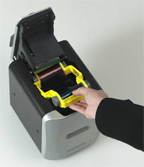 By Andy Matko, Marketing Manager, Magicard
The majority of ID Card Printers use dye sublimation technology, as do an increasing number of Photo Printers. But what is dye sublimation, and how does it differ from printing techniques like ink jet? This guide will give you the answers to the questions your customers and colleagues will ask you.
Dye sublimation, or dye-sub, is known for its high quality photographic output. Thermal printing is used to place layers of dye into the card surface. In dye sublimation printing, colors are not laid down as individual dots, as is done in inkjet printers.
Dye sublimation is also known as “Dye Diffusion” or “Thermal Transfer”.
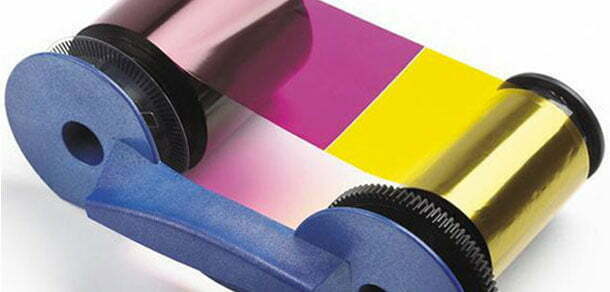
Inside a dye sublimation printer is a roll of transparent film that resembles sheets of red, blue, yellow, and gray colored cellophane stuck together end to end. Embedded in this film are solid dyes corresponding to the four basic colors used in printing : cyan, magenta, yellow and black. The print head heats up as it passes over the film, causing the dyes to vaporize and permeate the glossy surface of the card before they return to solid form. This is the “sublimation” part. Sublimation means to heat something and turn it into a vapor, then to form it back into a solid. Because the pigments go from solid, to gas, and back to solid, there is little mess compared to ink.
The vaporized colors permeate the surface of the card, creating a gentle gradation at the edges of each pixel, instead of the conspicuous border between dye and card produced by inkjets. And because the color infuses the card, it is also less vulnerable to fading and distortion over time.
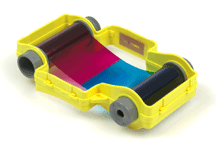 YMCKO PRINTER RIBBONS
The printer creates the card by placing layers of dye in the following order :
The colored image is a combination of the Y, M, & C layers which also produce a form of black. The K black layer allows very sharp defined black text, barcodes etc. to be added, as Y, M and C on their own will make a dark grey in practice.
The Overcoat layer acts as a protective film against wear and fading and can also carry a secure image, which cannot be photocopied – e.g. the Magicard Holokote security watermark.
 WHAT MAKES A DYE SUBLIMATION PRINTER SO GOOD?
There are two factors that contribute to the quality of dye sublimation printers. The first is continuous tone, and the other is un-dithered color.
The color produced by a dye-sub is the result of the mixing of pigments to get the actual color. This is in contrast to most other printing methods which use a tight group of colored dots which, when seen by the human eye from a distance, appear to be a color (a process known as “dithering”). Under magnification, the dots are clearly different colors, and when seen close up with the naked eye the picture appears grainy. Because only one color needs to be printed (instead of up to four), a dye sub can place more dots on a card. It can take a 1200 dpi printer to get the resolution a 300 dpi dye-sub printer is capable of.
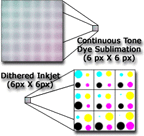 Another difference that helps is that because the color sublimes on the card instead of being laid down as little dots, the edges of each pixel are blurred. This gives the impression of blending for a more natural appearance. Dots from an inkjet leave large white gaps in between pixels, giving the impression of a grain.
Since longevity is something we all want from our prints, it’s also comforting to know that because dyes sublimate instead of just being painted onto its surface, dye sublimation prints resist fading and are colorfast.
Thanks to Magicard for submitting this article. You can learn about Magicard’s line of color ID card printers on the web.