Card, mobile credential, payment and security
FutureState, a new entrant to the campus credential, dining, and auxiliary service space, announced its new closed-loop, stored value and meal plan offering called BalanceU.
“FutureState’s BalanceU is designed to help colleges and universities lower operating costs, eliminate vendor lock-in, and gain real-time financial visibility across campus,” says Christopher Augustine, Co-Founder and Head of Product Development at FutureState.
It is hardware-agnostic so institutions can choose the front-end systems that best meet their goals without being constrained by legacy one-card architectures, he explains.
Because we are not weighed down with legacy codebase, we can iterate quicker to meet emerging needs like roll over meals and donated meals to food insecurity programs.
BalanceU eliminates some of the costs that are common in traditional meal plan environments, such as fixed POS integration fees, charges for access to real-time balance data, and forced hardware replacements.
Augustine says institutions only pay for what they use, and existing systems already deployed on campus can be redirected to operate with BalanceU.
FutureState began as a project at the University of Arizona.
In 2025, Arizona took a unique approach to campus transactions, identity, and mobile credentials. The institution created its own software ‘layer’ between the credential and the multitude of campus systems that consume the credential. At its most basic form, they created a hub that manages API endpoints.
It connects the wide array of services on the campus – access control, housing, campus rec, dining, retail, parking, attendance, events, vending, laundry – to the credential manager. Because the university controls this layer, they can swap out both the upstream credential manager as well as any downstream consuming system without disrupting the larger network.
It is a radical change from the way it has always been done in higher ed. Traditionally, the transaction system or the access control system managed these connections, and this locked the campus to that vendor.
The Arizona project was led by two of the leaders of Administrative and Auxiliary Operations, Sr. Director of IT Joe Harting and IT Project Manager Chris Augustine.
“What we built sounds basic and logical, but it is a radical change from the way it has always been done in higher ed,” says Harting. “Traditionally, the transaction system or the access control system managed these connections, and this locked the campus to that vendor.”
Harting believes they have upended an outdated model, and now they hope to help other institutions benefit from their work. In this pursuit, they founded a private company called FutureState.
In the same way that the company’s credential solution is designed to integrate the array of the wider campus vendor solutions, the FutureState meal plan solution connects to a broad range of dining-centric vendors.
Supported systems include:
Self-service retail integrations include:
FutureState founders say BalanceU provides free, unrestricted access to real-time meal plan and stored value balance data. This ensures institutions can power mobile apps, parent portals, analytics tools, and reporting systems without additional cost.
“Our goal from the beginning was to give institutions immediate access to their own data so they could do things like display balances and transaction history alongside the mobile credential,” says Augustine. “You shouldn’t have to negotiate with your transaction system provider or pay additional fees to use your campus data.”
With decades of experience in auxiliary services, Harting says he understands the complexities of meal plans.
“Because we built BalanceU from the ground up using an AI native development stack, we are able to incorporate the normal dining feature set as well as features I’d wished were available through my years running both card and meal plan offices,” explains Harting. “Because we are not weighed down with legacy infrastructure and codebase, we will also be able to iterate quicker to meet key emerging needs like roll over meals and donated meals to food insecurity programs.”
FutureState will showcase BalanceU at the NACCU Annual Conference in Covington, KY, April 19-22, 2026. They are seeking a small group of colleges and universities to pilot BalanceU in Fall 2026, ahead of general availability in Q1 2027.
Transact + CBORD (rebranding to Illumia in March 2026) announced a new agreement with sports and entertainment point-of-sale (POS) provider MyVenue. The partnership allows students to use their campus card and stored-value campus funds for purchases inside stadiums and arenas.
The integration adds MyVenue’s high-volume point-of-sale platform to Transact + CBORD’s campus commerce platform.
Designed specifically for hospitality environments, MyVenue supports mobile ordering, POS terminals, self-service kiosks, in-seat and suite catering. Its real-time back-office inventory and reporting helps venues serve more fans faster and streamline operations.
For students and fans, it means shorter queues, and for operators, it means greater oversight and improved efficiencies.
According to Transact +CBORD, most campuses manage dining and events with separate systems, creating friction for students and operational challenges for staff. This leads to long wait times, inconsistent payment experiences, and limited reporting and operational visibility.
This attempts to change that by providing a unified payment experience everywhere on campus without the need for a dedicated event card or payment tender.
“The partnership delivers a faster, unified commerce experience across campus and sporting facilities,” says Tim Stollznow, Founder and CEO of MyVenue. “For students and fans, it means shorter queues, and for operators, it means greater oversight and improved efficiencies.”
Colleges and universities deploying MyVenue, can simplify vendor onboarding and deployment by leveraging their existing Transact + CBORD network. By purchasing the solution directly from Transact + CBORD, the acquisition process can be streamlined.
“MyVenue stands alone in its ability to perform in high-volume, high-pressure environments where speed and reliability matter most,” says Chris Setcos, SVP of Partnerships, M&A, and Corporate Strategy at Transact + CBORD.
The Australia-based company’s solution is used at venues including Lumen Field, Ball Arena, AT&T Stadium, Dodger Stadium, and Little Caesar’s Arena. It also serves collegiate athletics, including University of Florida, Purdue University, and Michigan State University.
ColorID announced that it has achieved HID Elite Technology Partner status within the HID partner ecosystem. This designation recognizes them as one of a select group of partners demonstrating advanced technical expertise, strategic integration capabilities, and excellence in delivering solutions built on HID technology.
The HID Origo Technology Partner Program is designed to foster collaboration with technology innovators who integrate secure mobile access into their platforms.
Only five companies globally have achieved this designation, and we don't take that lightly. Having HID Global as a deep technical partner means we can guide organizations practically, securely, and at scale.
In a post welcoming ColorID to this new level, HID explains that “Elite status signals a partner we can confidently position when customers ask not only Which credential? but How do we modernize – practically, securely, and at scale?”
Danny Smith, Owner of ColorID says that becoming an HID Elite Technology Partner is a significant milestone driven by years of collaboration and the capabilities of ColorID’s CardExchange Cloud Suite.
CardExchange is a cloud-native identity management platform that centralizes the creation, issuance, management, and revocation of physical, wallet, and app-based credentials. Unlike other solutions, it enables all three credential types to be managed via a single platform.
“The platform unifies physical and mobile credential lifecycle management, securely synchronizing across multiple applications within the broader identity ecosystem,” explains Smith.
It is a significant milestone driven by years of collaboration and the capabilities of ColorID’s CardExchange Cloud Suite.
“Only five partners globally have achieved this designation, and we don't take that lightly,” he adds. “The identity infrastructure is genuinely changing across every sector we serve, and having HID Global as a deep technical partner means we can guide organizations through that shift practically, securely, and at scale.”
As an Elite Technology Partner, ColorID will continue to collaborate closely with HID to deliver integrated solutions across physical access, mobile credentials, secure issuance, and identity lifecycle technologies. The designation reinforces ColorID’s role as a trusted integration partner supporting customers across higher education, healthcare, enterprise, and government markets.
“ColorID has demonstrated exactly the kind of technical depth and integration excellence that defines our Elite Partner tie,” says Sanjit Bardhan, Vice President and Head of Mobile for HID. “Together, we're helping organizations modernize identity infrastructure with solutions that are secure, scalable, and built to last.”
Pictured in the image from left to right: Björn Lidefelt; Executive Vice President & Head of HID Global at ASSA ABLOY Group; Todd Brooks; Vice President, Products & Technology at ColorID; Mark Degan; Vice President, Marketing at ColorID; Martin Huddart; SVP and Managing Director, Physical Access Control at HID Global; Troy Johnston; Director of Strategic Alliances at HID Global; Sanjit Bardhan; VP & Global Head of Mobile at HID Global; Jason Schimpf; Global Director of Strategic Accounts of Mobile at HID Global.
In this episode of CampusIDNews Chats, Adam Brooks, Director of the Public Speaking Program at the University of Alabama, shares practical guidance for campus card leaders seeking to better communicate their value. His core message centers on the power of storytelling as a leadership tool.
Brooks challenges the assumption that more data automatically leads to better understanding. “People aren’t motivated by evidence. They’re motivated by story,” he says. While metrics and operational details matter, they rarely inspire action on their own. Instead, leaders must frame information in a way that connects to what their audience already believes and cares about.
A lot of campus card leaders want to communicate what their offices do. Instead, think about what the things that you're doing enable the organization to accomplish?
For Brooks, storytelling means structuring communication as a journey – moving “from something, through something, to something.” That structure helps listeners see how an office’s work solves real problems and supports broader institutional goals. Rather than expecting others to interpret raw information correctly, campus leaders must place their work within a narrative that highlights its purpose and impact.
Brooks notes that many campus offices have influence but not formal power. In those cases, communication becomes leadership. He urges professionals to think beyond the immediate conversation and consider the “audience of your audience.” When someone leaves a meeting, what message will they share with others?
Think about the audience of your audience – meaning whenever that person is done meeting with you, what is the thing you want them to walk away telling others?
By distilling complex ideas into simple, repeatable takeaways, leaders make their work easier to translate across an organization. Brooks advises asking a strategic question before every interaction: “What is the one thing I want them walking away, talking about at the end of this conversation?” In some ways this is marketing 101, but that clarity increases influence and strengthens relationships, even in rooms where decision-making authority resides elsewhere.
Addressing communication anxiety, Brooks emphasizes that nervousness is universal. Accepting it – rather than trying to eliminate it allows professionals to focus on connection and listening. He reminds leaders that most people enter conversations hoping for value, not failure.
To prepare for presentations or meetings, Brooks recommends returning to fundamentals. “There are typically five questions you can ask yourself that will get you through every conversation,” he explains. “Who, what, where, when, and why.” By keeping messages simple and centered on outcomes – the things their office enables the institution to achieve – campus card leaders can communicate with greater confidence and impact.
To check out the full interview, click the image at the top of this page.
TRANSCRIPT:
A lot of times, we think that data is going to work for us, and that the more information that we have – the more information that we're giving – is telling people everything they need to know.
But people aren't motivated by evidence. They're motivated by story. The most powerful story they have is the one that they believe.
For me, the art of storytelling is about making sure that you're engaging people and having information that is meaningful to them. It's telling them a ‘from something, through something, to something.’
It's helping them understand how this information that you're giving them is in service to someone or something that solves a problem that they're trying to achieve. And I think for a lot of people out there, they're focused on ‘well we have all this information, don't people just understand what we do?’ You've got to put that in the context of the story.
For a lot of campus offices, they have influence, but they might not have power. For a lot of folks, the way that you communicate is going to be how you lead. So it's not just about making sure you get in front of the right audience. It's ‘are you thinking about the audience of your audience.’ Meaning whenever that person is done meeting with you, what is the thing you want them to walk away telling someone else?
If you think about that, going into every conversation, distilling that complex idea down into something simple. It allows your idea to be easily translated and transmitted across an organization, which for a lot of folks is exactly how you increase your influence.
As you tell somebody something, and you create an opportunity when you build a relationship, where somebody's talking about you in your room that you're not in. You're only gonna do that if you're thinking strategically going, ‘What is the one thing I want them walking away, talking about the end of this conversation?’ If you go in with that mindset, you're going to be a lot more successful at achieving your goal.
A lot of folks think that their anxiety, their nervousness, is specific to them. “I just get so nervous talking to other people. This is not what I'm good at.” But the truth is that everybody feels that way. Every single person, in every situation, they're a little nervous. The best thing you can do is try to stop making it go away. Accept that it is real and then think that at the end of the day, each person you interact with wants you to succeed.
When you interact with somebody, you're not thinking, ‘I hope they're terrible.’ You're thinking, ‘I hope I can get something from this conversation.’ Be open to that, pay attention and listen.
The other thing is stop telling yourself you can't do something. Start telling yourself that you're capable of doing something. Get yourself in situations where at first you're going to be a little uncomfortable, but through repetition and getting that idea of being clear and concise about how you communicate, you're going to have the confidence that's going to enable you to feel like you are actually achieving the goal you're trying to make.
People ask me all the time, like, okay, ‘I've got a presentation coming up what do I need to know.’
I usually break it down in about five things. There are typically five questions you can ask yourself, that will get you through every conversation. And this is going to sound groundbreaking. But it's who, what, where, when, and why. If you know the answer to that, you're probably going to be more effective. Now, there are better techniques that you can apply to make that more compelling, but at the end of the day, keep it simple. Don't make it too complicated. Don't make it bigger in your head than it has to be.
I think for a lot of campus offices, you are often thinking about what you're doing, and you want to communicate what you do. Instead, think about what is the thing that you're doing, enable the organization to accomplish?
Start talking about it in that framework. Yes, you're providing credentials. Yes, you're providing cards or services that gets you into X, Y, or Z. But what does that enable? Start thinking about the end goal that your office accomplishes and talk to that. That is something that is motivating whether you're communicating up, down, or to anybody else in your organization.
In this episode of CampusIDNews Chats, Rosty Chen, ID Administrator at Michigan State University, explains how his campus card office undertook its first comprehensive rate study to ensure it was charging appropriately for student, staff, and departmental ID cards.
The effort began with a simple realization. “We’ve never done a rate study before,” Chen says. Since the office was established in 2009, pricing had remained largely unchanged, with little documentation explaining how rates were originally set. A pending leadership transition added urgency. As Chen’s manager prepared to retire, the team saw an opportunity to revisit long-standing assumptions and “start exploring why we’re charging what we’re charging.”
Rising costs following the pandemic also played a role. With materials and supplies increasing year over year, the office needed to understand how those changes affected its budget. Because the ID office is subsidized by the university and not fully self-generating, it was especially important to clarify which services were covered and which required cost recovery.
Chen and his team partnered closely with IT Finance, meeting weekly for roughly two months to analyze data and calculate direct and indirect costs.
You want to tell executive leadership, hey, we want to charge this. With a rate study, you say, no, we need to charge this.
A key challenge was determining how much staff time was devoted specifically to card production, since the office also manages NetID credentials and provides a series of other services. They broke expenses down by card type – prox cards, non-prox cards, and badges – factoring in labor, card stock, printer supplies, and overhead.
The findings were eye-opening.
Departments were being charged just $3 for non-technology badges that actually cost about $11 to produce. Non-prox cards, also assumed to be inexpensive, cost $14 each to produce but only generated a $5 replacement fee.
The $20 student replacement card fee proved sufficient, until factoring in a $10 credit issued when old cards are returned.
The study resulted in a detailed financial document and executive summary for leadership. Chen believes the process offers value to any institution operating on legacy pricing. “If you start asking the whys and getting into the details… it’s important to do this,” he says.
Armed with data, the team can now approach leadership with confidence, presenting clear math and justification for any recommended pricing changes.
To listen to the full interview, click the image at the top of this page.
TRANSCRIPT:
We originally decided to start because we've never done a rate study before.
The ID Office was started in 2009 and since then the rates were set, but we don't know where those prices came from and why we're charging what we're charging.
It coincided with our manager retiring and we wanted to tie some loose knots before she's leaving. That gave us the momentum to start exploring why we're charging what we're charging.
Of course with pandemic and the rising costs of everything we were noticing that the prices of everything keeps going up and up year over year. We wanted to re-evaluate how does that fit into our budget.
In terms of generating revenue, we are subsidized by the university so we're not a self-generating office.
Our assistant director was on board in her support for my manager and me starting this rate study. Also, because of my manager's retirement we had that great momentum to get done so we got our champions pretty fast.
We relied heavily on our IT finance team. They did most of the calculations for us, we're giving them the data, refining the data with them.
All said and done, it took us about two months of active weekly meetings to get everything in place and ready to go.
Obviously different offices operate differently.
At MSU, we do also IT like NetID credentials so we wanted to calculate how much of our full-time staff time actually goes to card production.
That was a big challenge for us figuring that piece out and of course figuring out the cost of the card stock, printer supplies, indirect and direct costs.
Because of our subsidy from the university, we don't charge for our first card for our faculty, staff or students.
We wanted to determine how many cards we actually charge for to begin with and then from there evaluate, what goes into production costs specifically for the cards that we charge.
We decided to kind of break it down by different types of cards that we provide.
We have prox cards, non-prox cards, and badges.
The biggest surprise for us was what we were charging for the badges.
We charged three dollars to departments for us to produce a badge for them. After we did the rate study, our calculations determined that actually it costs about eleven dollars to produce a badge.
So when we consider labor costs, all the printer supplies, indirect costs, everything tied into that, we're like, wait a minute, we're undercharging significantly there.
We were happy to find out that what we're charging the students for the replacement, which is twenty dollars, was actually sufficient within our production costs.
Where we fall short is we credit ten dollars back to our students when they turn in the old card. That process we want to reevaluate and potentially stop. Because the production cost is twenty dollars, if they turn it in and we give them ten dollars back, then we're undercharging for producing that replacement card.
Additionally, for non-prox cards, we were also surprised. We don't charge for the first non-prox card, but we charge five-dollar replacement. Well, first, second or third, it actually costs fourteen dollars to produce a non-prox card.
So this whole time we're thinking, oh, it's like plastic with less technology, therefore it's probably cheap. All of a sudden, that was our biggest surprises that we found out.
When you find your champions, it's definitely easier.
So we've had our champions with IT Finance and having that collaboration was very crucial to us to getting it done.
I think anybody can benefit from doing a rate study, especially if you're in a place like us, where we were charging how we always charge.
If you start asking the whys and getting into the details of the history and not finding the right documentation to support the charges, it's important to do this. What you'll end up with is a comprehensive financial document based on data.
It will serve as evidence for the points you want to make if you want to change your pricing.
If you want to go to executive leadership, you want to say, hey, we want to charge this. With a rate study, you can come in and say, no, we need to charge this. Here's our math for it and here's why we think we should charge that.
So our timeline I wanted to touch, it took us from about we started in December through January.
We had the rate study completed, and we had the executive summary ready for our leadership early February.
We are about two months’ out from the NACCU Annual Conference and the nomination deadline for the NACCU Awards program is just days away. Wednesday, February 18 is your last chance to honor a colleague, a peer, your team, or even yourself in one of seven categories.
The annual program recognizes commitment and innovation by individuals and teams in the higher education credential and transaction system industry.
The nomination process is simple.
At the awards page on the NACCU website, you’ll find a link to the unique nomination form for each category. Most submissions require only basic contact information and a description of why you feel this nominee is deserving of the award.
Take a few minutes and share your appreciation for a job well done by submitting a nomination. See you in Covington, April 19-22, 2026.
Awards include:
Presented to an individual who has advanced the industry and is actively involved in NACCU.
Presented to an individual who has made significant contributions to their institution, the industry, and NACCU within a relatively short period of time.
Presented to an institution that has developed an innovative technology-based solution to address a problem or capitalize on an opportunity.
Presented to an institution that has created a visually appealing and functional card or mobile credential design.
Presented to an institution that has created a compelling video to promote their program.
Presented to an individual who has demonstrated exemplary volunteer service to NACCU during the current or previous calendar year.
Presented to an individual – regardless of their formal title or role within the institution –who has made a meaningful impact on the campus card office by fostering collaboration or advancing its strategic profile.
Higher ed institutions struggle to attract and maintain staff, but the auxiliary service department at the University of Utah is taking a clever approach, offering cost-effective on-campus housing for employees.
This spring, the institution-owned Sunnyside Apartments is opening a new building, and staff are eligible to live there. Originally intended to house graduate students and students with families, Sunnyside now has three buildings that are also available for employees.
The location is just minutes from the main University of Utah campus. This lets employee residents save even more by using their mobile UCard to dine or order meals from on-campus venues. They can also use the free shuttle service to campus, reducing fuel and parking expenses.
Rent includes all utilities, high-speed internet, cable TV, free laundry, and on-site maintenance. These services can save residents an average of $500 or more per month.
In addition to the new building, Sunnyside is opening of a state-of-the-art childcare facility to serve children of both students and employees.
Employees can choose from a range of floor plans, including studios as well as 1, 2, and 3-bedroom units.
Rent includes all utilities, high-speed internet, cable TV, free laundry, and on-site maintenance. It is estimated that these included services can save residents an average of $500 or more per month compared to traditional rental options.
Monthly rent is comparable or lower than Salt Lake City averages, according to Zillow and Apartments.com estimates. Couple that with the package of included fee-free services, and it becomes a very attractive housing option.
Monthly rental rates are:
Amenities and benefits for residents include:
In this episode of CampusIDNews Chats, Brian Ashley, VP of Enterprise Sales at AccessNsite, details the company’s access control solutions, agnostic approach, and key higher ed clients.
AccessNsite focuses on unifying access control across campus, integrating seamlessly with existing enterprise systems such as ERP, time and attendance, and transaction systems/identity management platforms.
At Ave Maria, we replaced all the readers on the wall with Allegion, and we also serve as the university's campus card solution –and they are mobile-ready today.
“Because we're agnostic, we can actually step in and take over other platforms you may currently have without having to replace hardware, software, and other systems,” says Ashley.
This allows them to support a mix of readers, locksets, and backend systems already on the campus as well as introduce new options. The system supports hardware from manufacturers including Allegion, HID, Dormakaba, ASSA ABLOY, and others.
Ashley highlights the University of Houston as a prime example of AccessNsite’s ability to modernize access control without costly rip-and-replace projects.
Houston previously operated Lenel access control alongside Transact and used a mix of Allegion and ASSA readers.
“We transformed that whole system without ripping and replacing any of the current intelligent lock sets,” Ashley says. Today, the system supports more than 18,000 active doors serving over 75,000 students per semester. Transactions and identity management is now handled by Atrium.
A project at Ave Maria University in Florida showcases AccessNsite’s ability to execute fast, campus-wide transitions. In under six weeks, the company transitioned more than 700 doors and delivered a mobile-ready campus card solution.
“We replaced all the readers of the wall with Allegion, all of the lock sets are live, intelligent lock sets in the dormitories,” he says.
Ashley notes that for Ave Maria, AccessNsite also serves as the campus card solution, and they are mobile-ready today.
To watch the full interview, click the link at the top of this page.
TRANSCRIPT:
Hi, I'm Brian Ashley with AccessNsite, subsidiary of Unified Door Hardware and Security.
We've been, as a platform, around for over 30 years. One of our main objectives is to get the best access control solution into higher education, as well as Department of Defense, commercial, and other type platforms.
We know how to operate with other platforms, whether it be ERP, personnel base, anything that has to do with time and attendance, and also a full campus door solution.
AccessNsite is an agnostic platform. That means that we don't really care if you're utilizing Allegion readers, HID, Farpoint, Wave, any of them.
That being said, it also goes to the lock sets and all of the backend platform.
Because we're agnostic, we can actually step in and take over other platforms you may currently have without having to replace hardware, software, and other systems.
Also, at a very cost effective standpoint.
So, from a Dormakaba, Assa Abloy, Allegion, all of their intelligent lock sets, wall readers, all of them work currently within our system, whether you have a mix or you want to have one solidified system.
An example of our unification, and from an enterprise standpoint, is University of Houston. University of Houston was using a platform called Lenel.
They also had Transact Blackboard on the backend for a long time, and they had Allegion lock sets, as well as Assa lock sets.
We transform that whole system without ripping and replacing any of the current intelligent lock sets. We were able to keep current lock sets in place, current readers on the wall, still give them mobile solution ready solution, and transition all of their doors.
Today, we have over 18,000 active doors on that campus, with over 75,000 students per semester.
That is all tied in directly with Atrium. We do not manage the identity management, Atrium does, they do a great job of it.
We're not trying to do that project, we could, but, because we are partnered with them in a really great integration standpoint, it's really working out exceptionally well.
Another example is Ave Maria, which is in Ave Maria, Florida, next to Naples.
We transitioned over 700 doors at that campus in under a month and a half. We replaced all the readers of the wall with Allegion, all of the lock sets are live, intelligent lock sets in the dormitories, and we are the campus card solution there, and they are absolutely mobile-ready today.
We are very unique in the space. While we have dealers, we also have a direct relationship with our end users.
We are the tier one tech support. We use our dealer partnerships to make sure that installations and integrations go smoothly with local tech support.
When you call in tech support, you're actually talking to the manufacturer.
We'd love to talk to you. We look at this relationship as consultant. We like to sit at the table and make sure we find your best, most effective way to spend your money.
And as we are what's called a commercial hardware distributor, you will never pay more than what we provide to our dealers at the end of the day for lock sets and for service.
At Ohio State University, a multi-year project to modernize physical security is underway. It will replace security system software, thousands of door access readers of different makes and models, and credentials as well.
Ohio State is a perfect example that higher education has never stood still when it comes to access control. Credential formats evolve, expectations shift, and campuses must balance security and cost across thousands of doors.
Few people have witnessed the evolution of campus security as closely as Jeff Koziol, Business Development – Higher Education at Allegion.
The “AD” stands for adaptable. Rather than locking institutions into a single credential type or security system, the AD family was designed to evolve alongside campus strategies.
“I’ve been around long enough to see campuses migrate from managing doors with pin codes to managing them with mag stripe, then prox and later contactless,” Koziol says. “And now, of course, we’re in the mobile credential age.”
He estimates he has lived through five iterations of credentialing on college campuses, each bringing improved functionality but also a familiar pain point. Historically, every major shift required ripping out and replacing readers and locks across exterior doors, residence halls, offices, and academic spaces.
“Every time a campus moved from pin codes to mag, or mag to prox … or contactless … or mobile, they had to forklift all their locks,” he explains. “That is a very expensive endeavor.”
That repeated cycle of reinvestment drove Allegion to rethink how electronic locks should be designed – less as fixed hardware and more as adaptable infrastructure.
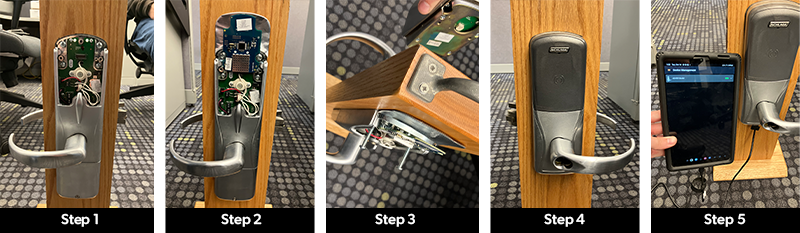
At Ohio State, the process to upgrade their offline Allegion AD250 locks to online wireless AD400 locks took several steps. Step 1: Remove the faceplate from the interior side of the door. Step 2: Add a wireless board to bring the lock online. Step 3: Remove the mag stripe module from the exterior side of the door. Step 4: Add the contactless/NFC module to the exterior side. Step 5: Update the lock's software to let it know it is now an online device.
The result of that thinking is Allegion’s AD lock platform, where “AD” stands for adaptable. Rather than locking institutions into a single credential type or security system, the AD family was designed to evolve alongside campus strategies.
The electronic lock is designed to extend access control economically, particularly in interior spaces, but they can support exterior use cases when needed.
Rather than forcing campuses into proprietary ecosystems, AD locks integrate with a wide range of access control platforms.
“They work with Lenel, Genea, CBORD, TouchNet, Software House – fill in the blank with the 50 or 60 other access control systems out there,” Koziol says.
By swapping out components and updating firmware, the lock can go from one configuration to another. You keep the physical lock, thus preserving your investment and removing the need to rip and replace.
The AD platform comes in three primary configurations:
Where ‘adaptable’ comes into play is that campuses can migrate between these configurations without replacing the lock body itself.
By swapping out interior components and updating firmware, the lock can go from one configuration to another. You keep the bulk of the physical lock, thus preserving the original investment and removing the need to rip and replace.
Few campuses better illustrate the value of adaptability than The Ohio State University.
In a NACCU webinar, Josh Bodnar, Director of Ohio State’s BuckID program, explains that when he started at the institution, the access control environment reflected years of building renovations and technology transitions.
“When I arrived in 2019, we had a mixture of electronic and other locks, especially in the residence halls,” he says.
At that time, the university had 2,300 Allegion AD250 offline locks managed through a Vanderbilt software system. They also had 2,500 Best BASIS G locks controlled via a dedicated instance of Lenel OnGuard.
A separate online security system from Transact Door Access managed the perimeter doors in residence halls and student life buildings. This system supported 400 Allegion AD400 locks.
The locks were originally installed more than a decade ago. Instead of writing off that investment, Ohio State leveraged the AD platform’s modular design to replace the ‘guts’ and extend the lifespan of the hardware.
Even with this large number of electronic locks, mechanical locks were and are still widespread. Approximately 4,000 individual locks using brass keys exist on residential suite and room doors.
Credential technology was also in transition.
When Bodnar arrived, credentials were almost exclusively magnetic stripe, but the institution has steadily moved toward contactless NFC cards with an eye toward mobile credentials.
One of the most impactful changes at Ohio State has been the upgrade of its offline AD250 locks to online AD400s. During summer 2025, all 2,300 were upgraded.
The locks were originally installed more than a decade ago as part of a major construction project. Instead of writing off that investment, Ohio State leveraged the AD platform’s modular design to replace the ‘guts’ and extend the lifespan of the hardware.
“We were able to leverage the adaptability and were hoping to get another 10 years out of that investment,” says Bodnar.
The work was done in-house rather than outsourced, saving the university $1 million in labor costs compared to hiring contractors to update the 2,300 locks.
Over the summer, Ohio State installed wireless infrastructure across eight buildings, upgraded the locks, added communication kits, and deployed new readers. While most students already had tap-enabled cards, some upper-class students required re-carding to ensure compatibility.
“That was a fun adventure for my team over the summer,” he says. “But it was a much easier lift because we could use the Mr. Potato Head nature of the lock to quickly change components.”
Crucially, the work was done in-house rather than outsourced. Bodnar estimates that decision saved the university $1 million in labor costs compared to hiring contractors to update the 2,300 locks.
When the upgrade was complete and all locks were online, Ohio State was able to shut down one of its legacy security software platforms – its Vanderbilt system.
Ohio State’s modernization extends beyond hardware to its software environment as well. The university has been migrating the student life access control system from Transact Door Access to Lenel S2. The goal is to bring all entry points managed by BuckID into a unified, online access control platform.
According to Bodnar, they moved the last readers from the old Transact system and onto Lenel S2 Netbox just before the end of 2025.
With the AD250-to-AD400 upgrade complete, Ohio State is already seeing the benefits of mobile-ready infrastructure.
Mobile support was baked into the deployment from the beginning.
We made sure the new locks were set up to read both our plastic card and our pre-deployment mobile credential. Every one of those 2,300 locks already have our mobile keys.
“At the time we installed them, we made sure that those locks were set up to read both our plastic card and our pre-deployment mobile credential,” he explains. “We have mobile keys already, so every one of those 2,300 locks already have it.”
That puts Ohio State well on the way toward its goal of making all student room doors tap- and mobile-ready.
The next phase however – replacing the remaining Best BASIS G locks with AD400s – will be more complex.
This will require taking a legacy lock off a door and installing a totally new piece of hardware. They plan to pilot the approach in a single building before scaling the effort across the remaining 2,500 doors.
Down the road, they are evaluating how best to handle older buildings that still rely on brass keys.
For new construction and major renovations, Ohio State’s direction is clear.
“Everything that gets built or gets renovated in student housing is going to have an online lock on the suite and room doors,” says Bodnar. “And right now that will be the AD400.”
Ohio State’s experience validates the original vision behind Allegion's AD platform. It has delivered on the promise of creating an access control infrastructure that adapts as campuses evolve.
For Allegion’s Koziol, Ohio State’s experience validates the original vision behind the AD platform. It has delivered on the promise of creating an access control infrastructure that adapts as campuses evolve.
The lesson for higher education is straightforward.
Technologies will continue to change and budgets will remain constrained, but institutions that plan now will be better positioned for what comes next.
Infrastructure that enables upgrading security software and credential technology without the need to rip and replace is the very definition of adaptable.
When the University of Alabama transitioned to a Mobile First credentialing model, physical student ID cards were largely eliminated. Students, however, still had an affinity for the plastic memento, and thus the UA commemorative was born.
Courtney Petrizzi, Communications Director for Finance & Operations at the University of Alabama, explains that the assumption was that mobile credentials would fully meet student expectations. After all, the new credentials were wildly successful on campus. Feedback from students, however, revealed something was missing.
Revenue from the commemorative card is now high enough to make up for the replacement card fees they lost in their transition to mobile credentials.
“Students still wanted a tangible piece of campus,” says Petrizzi. That desire wasn’t about access or technology, but about pride and connection. Graduates wanted something they could take home, show family, and keep as proof of accomplishment.
Rather than returning to mass issuance of physical IDs, UA created a graduate-only commemorative card. The card is intentionally non-functional – no access privileges, no embedded technology – serving purely as memorabilia.
“It’s literally just a piece of plastic that you carry around with you,” Petrizzi emphasizes. Eligibility is restricted to students who officially graduate, reinforcing its symbolic value. The card includes clear language stating it does not confer current student status, which was important for compliance and clarity.
UA partnered closely with Strategic Communications to design and brand the card appropriately, recognizing it as an external-facing item once students become graduates. This collaboration extended into marketing, with careful planning around messaging, timing, and visual consistency.
Launching the program required new operational processes, including shipping credentials for the first time. UA coordinated with its mailing services, legal team, and registrar to manage graduate lists, refunds, and quality assurance.
Marketing efforts spanned email campaigns, social media, digital signage with QR codes, bookstore partnerships, and word-of-mouth promotion through student leaders.
While early adoption was slower than expected, awareness has grown steadily.
According to Petrizzi, revenue from the commemorative card is now high enough to make up for the replacement card fees the card office lost in the transition to mobile credentials.
To watch the full interview, click the image at the top of this page.
TRANSCRIPT
In this episode of CampusIDNews Chats, we spoke with Courtney Petrizzi, Communications Director for Finance & Operations at the University of Alabama. She detailed the institution’s launch of a commemorative card offering for graduates that did not receive a traditional campus ID card because UA now issues mobile credentials.
Here is a transcript of what she said:
Our commemorative card started when we transitioned to Mobile First. That means none of our students get issued a physical credential unless they have an ineligible device.
We thought, Mobile Card – that's it we're done. That's all the students wanted. But then we started getting feedback that students still wanted a tangible piece of campus.
They wanted to have something that they could take home with them, show their parents, show off that they were a part of the university.
We asked the students what that would look like, because we weren't going to go back to start printing all of these physical cards again. We asked the students, why do you want this memorabilia? What's the most important thing?
They said they want to show that they graduated from the University of Alabama. That's what you hold on to when you're a graduate.
That is what we decided to tie into for the commemorative card. We wanted it to be restricted to just students who have graduated from the university. That's a point of pride for us, because anybody can say that they've gone to the University of Alabama for a semester or two or a couple of years. It's a whole different story when you say, I graduated.
And I can prove it.
You can't carry your diploma around, but you can stick that right in your pocket. You can pull it out any time and have proof that I graduated. We wanted to commend that hard work and effort.
Our commemorative card is just a piece of plastic. There is nothing attached to it. There is no technology. You can't get into the library. You can't do anything with it. It's literally just a piece of plastic that you carry around with you.
On the back of our card, we have a statement saying that this does not guarantee current UA student status.
Because we have a student who had just graduated with a bachelor's, but they turn around next semester and they're going for their master's. They can't use this card for anything.
Setting up the commemorative card was super easy for us. We went to our strategic communications office. We told them what we wanted to do, why we wanted to do it, what the commemorative card was going to be, what we wanted it to look like, how we wanted to tie it into graduation for graduating students.
They took it from there. They gave us design options. We said these are the parameters, this is what we would like to see.
But what do you, as UA STRATCOM, need as a brand to send this out into the world?
It's an external card at that point, once it becomes a student graduate. So we had to get approval from strategic communications. They helped us market it.
We had to create a marketing plan to surround that.
When are we going to announce it to students? How are we going to get the outreach to the students? What are we going to tie into?
Then we had to think about the process of shipping these cards. We have never shipped any sort of credential from our office whatsoever. So this was completely new territory.
We had to get with our mailing office. We have a USPS-based service in our student center. We had to connect with them, see what the requirements were, what we had to do to get those shipped out. What the legal components were. What if their card arrives damaged? What if they don't receive their card and they pay money for it? We need to ensure that they're getting it.
So we had to talk with our legal department, work with the registrar on the statements of what we wanted to, you know, if someone didn't receive their card or it was damaged.
We also had to put in the request for the registrar's office to receive a list once graduation applications closed.
We received a list of all the students that have applied to graduate, so then we market to them.
They can start purchasing the card. They come to our office. We validate that they're on that list.
We also received another list from the registrar's office once graduation has completed, the final grades are in, we had the final say and who graduated.
We will refund students if they didn't graduate, if they had that one course that they need to finish. We let them know, we email them, we say, hey, we noticed this. We're still here for you.
If you're adding that one class, if you have any questions, if you're going to go back through, you know, another semester, this is still going to be an option for you. But right now, we are going to refund that for you.
I'm a big marketing communications person, so I was super excited to get my hands on this one.
We wanted to start with commencement, but we couldn't nail it down. That's a little tough. The real estate is very small.
But then they raised a great point. In our bookstore, they do diploma frames and alumni sweatshirts. They do all these things and they are a partner under our Enterprise Services umbrella.
I connected with their office and they let us put an ad for free graciously in their newsletter that goes out to graduating students as well saying, hey, get your memorabilia.
Get your fun diploma frame or whatever they have that they're offering. They let us put that in their materials. That was one of our biggest touch points because everybody's looking for that really cool alumni sweatshirt, right?
So when we had that in there, it was a big pull for us.
We also do email campaigns, which is typical for our office for anything we market. We reach out to the students’ university email. We do social media pushes. Not only straight from our office, but we rely on strategic communications.
Our campus partners like the bookstore, anybody who is celebrating the students for graduation, we latch on to them. That's why we love our campus partners, they didn't even question it. They said absolutely because we want to have that cohesive communication strategy across all of our areas.
We also do digital signage, which is really big for us. We put QR codes that link students directly to the online store to purchase their card.
We have UTM parameters associated with that so we know digital signage in housing was great for this. We know students are scanning like crazy, but over here in the business school, they're not really scanning.
They’re not looking at the signage, so what can we do to reach those students specifically and help grow the awareness of it.
Of course we always rely on word of mouth too. We have some of our big influencers on campus. Our capstone men and women are student leaders. We had a couple of them purchase the card organically on their own. We did not reach out to them specifically.
They purchased one on their own and when we went to pull the card I said, hey, I know him. I know that face, so I reached out and talked with that student and said, do you mind sharing this?
Is there an avenue I'm missing? He pointed out some newsletters that go out to students that I wasn't aware of, and he told me “I'm telling everybody about it. I'm showing people because a lot of students rely on that word of mouth.”
You know, they're not going to actually do it if it comes from the university. Sometimes they want to hear like, oh, my friends got this. They're all doing this. I obviously have to do it too.
Ultimately, our results were slightly disappointing at first. I'm not going to lie.
The students told us they wanted it. They said this is a need. We are so excited. But we didn't see that traction. So we were a little confused about that separation.
What we realized is when we launched – we originally started issuing community cards in 2023 – but we went Mobile First in 2020. So there was still a year of students that had a physical credential.
They didn't really have that need anymore.
Since then, we've done more marketing to the students. We've increased our digital signage. We've increased our ads that we place in the student newspaper, and things like that.
We are seeing that uptick.
I would want to sell, if we have a graduate class of 4,000, I would sell 2,000 cards, right? That's the ultimate goal.
But it's growing and letting students know that this is now a new part of the campus experience towards the end of your time at Alabama.
As we, as we evaluate that further, we're hoping that it's going to grow.
It's successful now. In one day, we sell enough cards to cover what our previous replacement cost was.
To rephrase that, we sell the commemorative cards for $50. Our replacement card fee when we had physical credentials was $35.
When I do the math and figure out how much it was in one day's time, we're getting about 40 to 50 lost card revenues.
So for us, our alumni affairs, we adore them, but we're not partnering with them at this time.
That's why our card is called the UA graduate commemorative card, instead of like the UA alumni card.
They're not involved at this time. We are looking at the opportunities for the future to maybe get them involved, but we wanted to see what the revenue was going to be.
We wanted to understand what the labor was going to be, because when you involve another department like that, especially alumni who has their own branding, their own identity, you know, they have parameters that they want to work by.
We really wanted to control this for now because we're in cards. We know what we need. We know what's going to look good. We know how the students interact with that material.
Alumni affairs, while we love them and they know our students, they don't know this industry.
The biggest student group that we've seen that love these cards so much is our online students. They don't get the same campus experience that our on-campus students do.
They don't get to come do free stuff days. They don't get to come and get the t-shirt and the swag and all the stuff that kind of is that on-campus experience.
When we launched this our UA online sent us an email saying this is awesome. This is a great way for our students to feel connected, to validate their experience.
We wanted to celebrate those students and let them have their moment as well, and say they're a part of this just because we live 10 hours away. They're part of the university, so we wanted them to have that opportunity.