Card, mobile credential, payment and security
The width of a magnetic stripe track is standardized at about one-tenth of an inch, but as you have likely noticed, most magnetic stripes are wider than this. Why is this? It is because there are multiple tracks on the same stripe. Think of a track as a line of text on paper. You can have a single line or you can stack multiple lines on top of each other and fit more data on the same page. Such is the case with magnetic stripes. Stacking multiple tracks on top of each other enables multiple ‘lines' of data to be stored on the same stripe and card. Most cards are of the two-track or three-track varieties though it is technically possible to have as many tracks as will fit on the card.
The reason that most cards contain either two or three tracks is that the industry has standardized around these types. The ISO/IEC 7811 standards, titled Identification Cards – Recording Technique, detail the data formats and encoding schemes for tracks one, two, and three. By establishing parameters for all parties issuing standardized cards, the industry has been able to develop encoders, readers, cards, and applications that are interoperable.
Think of it this way. Imagine if there was not a standard for key elements such as the physical location of the stripe on the card, the size and location of the tracks, the encoding scheme used to store data on the tracks, and the specific data elements and their positions. There would be no way that a card issued by one bank could be read in an ATM deployed by another bank. Nor could you be certain that your credit card would be readable to a point of sale device at a merchant location.
The standards for Track One were originally established by the International Air Transportation Association (IATA). Its intended use was for the storage of airline ticketing and travel reservation data. This use, however, did not materialize and the track has been co-opted for various other applications. Track One uses the Alpha Data Format, so it uses seven bits to store each character. With the data compression established at 210 bits per inch, it is capable of storing seventy-nine alphanumeric characters. It is read-only, and typically includes the cardholder's name and account number.
If you have ever wondered how an ATM is able to display a welcome message with your name on it, Track One is the key. The ATM reads your name from Track One on the magnetic stripe and displays it on screen.
Frequently people describe a magnetic stripe as ABA-standard or ABA-encoded. This is in reference to Track Two, as its definition was established by the American Bankers Association (ABA). ABA standard encoding is a requirement for a card to work in the transaction processing networks for credit, debit, or ATM functionality. While the entire magnetic stripe is often referred to as ABA-standard or ABA-encoded, only Track Two's standardization is required to make a card ABA compliant.
The standard for the Track Two format uses the BCD encoding scheme and thus is capable of holding only numeric data. The 40 numeric characters are compressed at 75 bits per inch. It is read-only, and holds in its first field a 16-digit account number.
The Thrift Industry developed Track Three, though like the IATA's efforts with regard to Track One, the track has been co-opted for a variety of other uses. The main differentiation from Tracks One and Two is that Track Three was designed to enable read-write capability. It was designed to be updated with each transaction and can hold 107 numeric five-bit digits at a compression rate of 210 bits per inch via the BCD encoding scheme.
It is important to remember that there is no actual difference between the physical make up of the magnetic material on the tracks. All the tracks are exactly the same until they are encoded. The differences only manifest themselves when a card issuer decides how to encode data and what data to encode on a specific track. If the need to follow the standards is not important to a specific issuer, each track can be used in any number of ways.
There are two distinct states for the magnetic particles: positive and negative polarity. A situation in which two and only two states are possible is referred to as a binary situation and forms the basis for all digital communications. All digital information is represented as a series of ones and zeros that, in a specific pattern, signify meaningful data such as alphanumeric characters, audio, or video.
In magnetic encoding the zeros and ones are actually positive and negatively charged areas of the magnetic stripe. Much like Morse Code represented letters and numbers via a series of dots and dashes, the positive and negative polarities do the same.
For the data encoded on a magnetic stripe to be meaningful to a reader that will ultimately access the data, the two must speak a common language. Thus, encoding schemes have been created to serve as these common languages. The two schemes commonly used in standard magnetic stripe encoding are the Binary Coded Decimal (BCD) Data Format and the Alpha Data Format, both standardized by the American National Standards Institute (ANSI) and the International Organization for Standards (ISO).
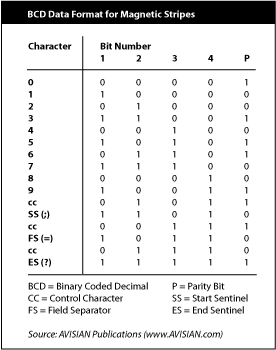
The BCD format uses a series of five individual zeros and ones (or bits) to signify each character. Four of these bits actually specify the character while the fifth serves as means for the reader to verify the accuracy of its read. This fifth bit is called the parity bit and it always ensures that there is an odd number of ones in the five-bit character. If the reader ever determines that a single character had an even number of ones, it would recognize that something was wrong and reject the reading, prompting the user to re-swipe the card.
In the BCD scheme, four bits make up each character and thus there is a maximum of 16 unique characters that can be represented (2 to the power of 4 or 2 x 2 x 2 x 2 = 16). Obviously, alphabetic characters cannot be used as there are 26 letters and only 16 available characters. The BCD provides the numeric character set (zero through nine) with six left to spare. These six characters are called framing and control characters and are used to signify functional descriptions to a reader. The Start Sentinel (SS) signifies the beginning of the string of meaningful data on the magnetic stripe. Prior to the SS, a series of zeros (referred to as syncing characters) gives the reader a chance to sync up with the bit string. The End Sentinel (ES) tells the reader that the string of meaningful data is complete. The Field Separator (FS) informs the reader that one block of data is complete and another is about to begin, for example the ID number is complete and the expiration data is beginning.
In the Alpha Data Format, seven bits or zeros and ones are used to represent each character. Similar to the BCD Format, the seventh bit is a parity bit so each character is actually signified using six bits. This enables the Alpha Format to represent 64 unique characters (2 to the power of 6 or 2 x 2 x 2 x 2 x 2 x 2 = 64). This is sufficient to enable a full alphanumeric character set to be presented including 26 letters, 10 numbers, and 28 remaining characters.
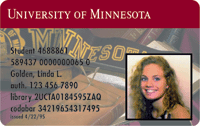 by Ted Sander, Food Service Director, University of Minnesota
The University of Minnesota, a CBORD OmniAccess user, is one of the largest universities in the United States, enrolling more than 35,000 students on two campuses in the metro Minneapolis/St. Paul area. Approximately 6,000 of these students live on campus. We have Residence Halls that are as much as 10 miles from each other. The University operates 8 traditional Residence Halls (6 with Dining facilities), 3 apartment style complexes, 3 Convenience stores, and 19 “Retail” locations. With such a broad range of facilities, it was not in our interest to compete with ourselves by making our points (“FlexDine”) program available to a variety of vendors, but services that could enhance our students on-campus experience are worthy of consideration.
There has long been a demand for “after hours” delivery services, and a wide variety of vendors providing that service from various off-campus locations. With the growth of our FlexDine program, we recognized an opportunity to enhance the services provided to our students by contracting with existing off-campus vendors. We wrote our request for proposal to include a number of factors––such as being able to serve all of our Residence Halls, limiting service to prime periods of demand (evenings and weekends), and (of course!) to be able to obtain a fair commission structure. All community pizza vendors were invited to submit a proposal, but in the end it was a local company, “Davanni’s Pizza and Subs,” that was able to satisfy all the criteria.
Starting its third year now, Davanni’s provides services from two locations: one located just off of our West Bank campus, that delivers to all Minneapolis locations, and a second store, which serves our St. Paul campus. They can only accept FlexDine on orders for delivery to our specified Residence Halls. They cannot accept it from walk-in customers, nor for delivery to other on-or off-campus locations. They have agreed to limit the transactions to food items only, to preserve the contractual relationship the university has with a different beverage vendor. Each location is equipped with a dial-up Lyric or Encore terminal from CBORD. Students call to place their order, and provide Davanni’s with their student ID number. Davanni’s transacts the points on the reader, and then processes the order for delivery.
At the point of delivery, the driver verifies the ID number from a student’s “UCard.” Students are not allowed to use their points for tips, only for direct food purchases. This was of initial high concern from all vendors during the proposal stage. Davanni’s has verified that students always seem to have a few dollars to spare, and that their drivers have not suffered loss of income because of the program. If anything, the increases in their deliveries have benefited the drivers! The high point of sales, to date, was last January, with almost 1,700 deliveries, averaging $15.80 each.
In general, the program is very well accepted, with little downside. There has been some adjustment needed on the part of the OmniAccess staff to accept infrequent trouble calls on late evenings and weekends; these consist of simple issues with operation of the Lyric or Encore. At times where there have been larger systems problems, it has usually been Davanni’s that notifies us first––allowing us to intercede before there is major impact on all of our other operations! We have noticed a dramatic increase in the purchasing of additional FlexDine since the inception of this program, and also a reduction in the amount that was left over at the end of the school year. While we can’t say that one caused the other, we have noted that by offering more ways to use the program its usage at our on-campus locations has been enhanced.
We receive almost constant requests to expand the program to other off-campus vendors. At this time, we are only evaluating those that can clearly be seen to offer an additional enhancement to the program, not “more of the same.”
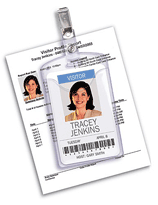 If you’re looking to get a better handle on visitors or other guests to your campus or facility, Avery may have just the solution for you. Not only will its badge and ID creation software track all your visitors with an optional barcode, it also provides good-looking badges, complete with the visitor’s color photo, plus a digital log of all visitors.
The fact is that even organizations using top of line identification cards and processes for regular populations, often use lax processes for visitors. A non-personalized “Guest” badge and a paper sign-in sheet are weak indicators of a person’s right to access a secure location. Yet, the effort and expense required to provide the full-blown ID badge to temporary users is often too much. This system fits squarely in between these two scenarios—providing enhanced authentication and security in a cost effective easy to use system.
“We’ve been extremely successful with our temporary ID cards,” said Adam Bratter, group product manager for Avery Dennison Office Products, Photo ID Systems, Brea, Calif. “It’s exciting to talk to end users who have used it.”
The Avery Dennison software system prints ID cards on a variety of different paper stocks, such as name badge labels and badges that can fit into plastic badge holders, said Mr. Bratter. There’s also a third type, a self-laminated ID badge that doesn’t require a heat laminator. “You print the card, lift it from the printed sheet and you fold the self-adhesive lamination over the badge,” added Mr. Bratter.
“The software will run on standard PCs using Windows XP or Windows 2000 (see below for complete requirements.) You can use any standard Deskjet or laser printer, or an inkjet if you want color,” added Mr. Bratter. Photos are captured by a simple web camera.
If you want to keep track of visitors, barcode-affixed badges can be printed. “This allows you to have the visitor scan out, so you’ll need a barcode scanner,” said the product manager.
“We actually do sell a complete system kit, which includes software, camera, barcode scanner, the mini tripod for the camera and a USB hub to hook it all together,” he said. “The complete kit sells for $995. Or the software can be bought separately for $375.”
The software, he said, includes over 50 templates designed not just for visitor badges, but also for events and long-term IDs.
“We want to make sure it’s appropriate for the needs of the organization. It’s simple paper-based ID badges with the ability to print bar codes. It’s a very simple solution, very basic,” added Mr. Bratter.
It takes users an average of 45 minutes to install and set-up the system for use, even less for training–about ten minutes, said Mr. Bratter, adding “one of the key benefits is that the software is easy to use.”
Another key benefit is the elimination of easily forged paper visitor logs. They are difficult to archive and if you need to know a specific time and day that a person was on campus or in your company building, a it can take hours of searching, explained Mr. Bratter. “Our system maintains a digital log. This way you know who has been on your campus and when; and can search the digital record quickly.”
The software provides the ability to issue single day badges. “The next day, if that person comes back with the same badge, you’ll know the badge has expired,” said Mr. Bratter. “But you can also issue multi-day badges. And all badges, if they have a barcode printed on them, will allow visitors to scan in and scan out.”
The company is now getting ready for the ASIS show Sept. 27-30, in Dallas, Tex., where it will introduce version 2.0 of the Photo ID software.
“The first thing we’ll be adding is a card reader to the system that can read driver’s license and business cards to auto-populate the fields on the id badge,” said Mr. Bratter. “Another new feature is list import that allows you to import names and visitor information (from external sources). That’s helpful for large events because it will allow you to import names ahead of time. We’ll also be introducing two new lines of our ID badges,” he added.
Another announcement at the show will be that the templates to print blank Avery Photo ID Badges will be available in a number of Avery’s alliance partner’s software products later this year. These partners, said Mr. Bratter, include companies that produce electronic visitor management software and electronic access control software.
Sold through dealers, the software was launched last September. “You can buy it from a security products dealer or from a commercial office products dealer,” he said.
Click on the ad to take a very cool online tour of the Avery Photo ID system:
Minimum system requirements for the Avery Photo ID system:

So you have decided that you are interested in adding a banking partnership to your card program, but you are not sure how to begin? Ask yourself the following question: ‘How can I best position my card program to attract a financial institution’s interest?’ The answer: Become a salesperson for your program. Know your facts. Try to understand the motivations of the bankers with whom you will meet.
Here are some specific things to consider:
1. What percentage of graduates will settle within the local area?
If this number is high than you may be an attractive candidate for a local bank. If it is low a local bank would see little opportunity to recoup the investment through lifelong customer relationships. If the bulk of your students leave the area upon graduation, a super-regional or nationwide bank may be better suited. The key is to understand the footprint of the bank (the geographic area of its branch network) and the patterns of your graduates.
2. Be realistic with your financial expectations.
These relationships are not going to fund your program. While they may provide some modest revenue sharing, this should be viewed only as an ancillary benefit should it materialize. In some cases, fees assessed to the campus exceed the revenue share resulting in a net cost to the campus. Banking programs should be pursued primarily for the student service and administrative savings aspects. To put in terms we all can understand–if the banks sense you are only interested in their money, they won’t call you after the first date.
“Student accounts are a money loser for the bank.” This is perhaps the most common statement from a banker when it comes to campus programs. Whether or not this is true is difficult for any of us to know for sure. Privately, bankers have suggested that this is really not the case. When a campus is negotiating revenue share, however, it is obviously more advantageous to underestimate revenues than to boast of them.
The key is to be realistic. Talk to other campus administrators that have banking partners and find out how their agreements are done. Knowledge is certainly power in this case.
3. Evaluate how a student will conduct business with the bank and make sure the infrastructure will be there to support it.
For a time it was thought that the bank had to put a branch on the campus for the program to succeed. While this certainly can be a major asset, it is impractical in most cases. The initial costs are large because a functioning branch requires a prime location and a substantial build-out including high-level security systems and the installation of a vault. Ongoing costs associated with staffing and support are sizeable as well. Because of this, on-campus branches are the exception rather than the rule.
Some campuses have relied on an existing branch located close to the campus. Others have been forced to accept full-service ATMs as a stand-in for the branch. A number of financial institutions have deployed either staffed or fully automated self-service centers. These centers can provide many of the services of a branch with the exception of handling cash (other than via the ATM). This excludes them from the requirement to install the expensive vault at the location. The key is to make sure that you know how your students will conduct business with the bank and ensure that adequate infrastructure is in place. If it is less convenient for your students to bank with your partner than with another bank, they won’t do it.
4. Understand the local merchant base.
If you are anticipating the use of your card as a payment vehicle at merchants in the community, you must understand the ability of the bank to support this function. Take note of a financial institution’s existing merchant base and their realistic plans for expansion. Also, investigate the nature of these merchants and make certain that they include or will include those that service your students.
5. Make your business more attractive.
Consider embedding the request for card-based financial services with your institution’s request for depository relationship services. The value of a long-term relationship with the cardholder can be significantly enhanced if it is tied to an immediate and proven revenue opportunity for the bank.
Follow these simple steps and you will be well on your way to having productive, informed discussions with potential banking partners. And that is half the battle.
In the following Q&A section, key biometric concepts are presented to accompany the article titled, ”Bolt-on biometrics.”
Under the broadest definition, any measurable characteristic or behavior that can be used to establish identity.
The process of measuring a biometric and associating it with an individual.
Like any other item used for identity verification, biometric templates need to be distributed to verification points and then managed over the lifecycle of that identity. Although biometrics cannot be “revoked” their privileges still need to be turned on/off as a person’s role changes.
Some biometrics, most famously fingerprints, can be “left behind,” even inadvertently, while others, such as iris scans or hand geometry leave no trace after presentation.
When the user must consciously choose to present their biometric for verification. Some methods with a visual component only require an individual to step into a field of view where they may be “passively” identified.
If a biometric is being compared to a pool of measurements looking for a match, this is known as “1 to n” or “1 to many.” When a biometric measurement is compared to a specific known template for a match this is “1 to 1.” Generally, 1 to 1 is faster, easier and more accurate. However, 1 to n is especially useful in law enforcement and security applications where an individual’s identity is not yet known.
There are two measures of accuracy for biometrics, false acceptance rates (letting the wrong person in) and false rejection rates (keeping the right person out). Depending on your application you may choose to favor one or the other and most biometric systems can adjust their sensitivity one way or the other. The crossover error rate (CER) plots these values against each other to provide a true picture of the accuracy of the system. This allows comparisons between different biometrics. Generally, a lower CER is the most accurate system. Since this point is where the two values are equal, it is sometimes referred to as the equal-error rate.
It depends on the application. Most biometrics operate relatively fast in a 1 to 1 match situation. However, the total throughput for a transaction, including presentation of the biometric, verification and feedback, may exceed the user’s threshold. This would be especially true of any high volume access control or payment situation. The longer the line is, the more important speed may be.
Whether viewed as sci-fi, Orwellian, or other, most observers agree that our day-to-day use of biometrics will increase rapidly over the next few years. On campus, the reality is that biometric implementations are likely even more immediate. That means you should get involved, or at least pay attention.
In the context of campus programs biometrics are simply any measurable characteristics of your body that can be used as an identifier. Most people view the biometric as an extension of the numerous identities already used on campus. As programs strive to provide additional security and convenience, biometrics offer new set of solutions.
Several biometric vendors have realized that the easiest path to success comes from adding to, rather than replacing existing systems. This is especially true in security applications where infrastructure is costly and difficult to change. They developed biometric components designed for integration with your current infrastructure. While not quite plug and play, these offerings do significantly lower barriers to implementation.
With that in mind, here are three examples for biometric implementations that can let you realistically begin deployments on your campus. We call them bolt-on biometrics because they can likely attach to your current campus card infrastructure with relative ease.
Physical security is a great place for initial biometric exploration. Even if your campus card or identity program does not work directly with security today you still can have a role and benefit from early work with bolt-on biometrics.
Before your biometric test drive, pick your population. Biometrics shine for small population, high security applications. Your campus may be host to a high profile or high-risk lab with very limited access. Or likely you have a secure computing facility that requires tight control. If you do not already have groups or areas that have expressed interest in biometrics, these offer some possible test beds.
Once you have a likely location, pick your biometric. For brevity’s sake, this discussion covers three specific options. Each was chosen because it can attach to a wide range of access control systems without substantial software integration-thus the concept of bolt-on biometrics. Of course, your security provider may have other components available and you should consider all your options.
Each of our bolt-on biometrics provides multiple methods of communicating with access control systems, or even operating as independent access control systems. Several different biometrics are being aggressively promoted for both security and transactions with technology from dozens of vendors. Two popular choices are finger scanning technology from Bioscrypt and hand geometry solutions from IR Recognition Systems.
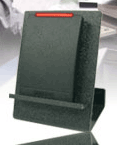 A new smart card programmer from HID has given the University of Nebraska at Lincoln more start-to-finish control over card issuance, while giving its students and faculty an increased sense of security.
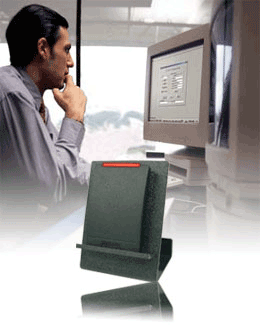
The iCLASS™ CP400 Card Programmer is a hardware and software package that allows a user to read and write information on HID’s iCLASS™ contactless smart cards.
“Some customers will want to do something relatively simple like programming a custom PIN number on the card,” said HID’s Marian Pefley, director of product marketing, high frequency technologies. “Other customers use the software to create command cards to change the features and functions of the readers, such as LED brightness, speaker volume or standard output format.”
The CP400 can program personal PIN codes directly on the ID card for reading with HID’s iCLASS 13.56 MHz contactless RK40 (reader with keypad) and RWK40 (reader/writer with keypad). Customers, such as the University of Nebraska-Lincoln can now stock blank cards and program them with access control numbers, PINs, and custom application data at issuance. With four distinct fields capable of holding 16 characters, the option to use the card to store personnel data, library patron IDs, demographic indicators to determine eligibility for specific services, and other customized applications is open to the customer.
“The iCLASS CP400 gives our partners the ability to offer flexible and customizable value-added card options to their card holders,” said Mark Scaparro, HID’s executive vice president of sales.
 This programmer “has given the students and faculty at the university an increased sense of security because we’ve programmed unique data on the access control card,” said Dan Floyd, director of shared computing services at UN. “In addition, we’ve created efficiencies with card management because we can now distribute cards from start-to-finish…”
That came in handy during fall enrollment where the university distributed some 10,000 cards,” he added.
“For flexibility, the user can change reader functions without needing to consult the factory,” says Ms. Pefley. “This is especially popular for OEMs who would like to stock standard readers and customize them for each job on the fly. There are also times when a specific card may need to be reprogrammed, such as when a user’s name changes and so forth. The CP400 enables the user to program their own cards and customize their readers.”
However, right now, the University of Nebraska is using the CP400 “to prime the chip in the cards for door access,” said Sue Ostrander, UNL’s ID systems manager for shared services. “We also plan to use the contactless chip in other systems in the future,” she added.
As to why the university went with the programmer: “UNL preferred the option of encoding the chip with an ISO number owned by UNL instead of purchasing numbers from a vendor,” said Ms. Ostrander. “This programmer was chosen because it was the fast and easy way to prime the cards.”
“It is very easy to use and has added on very little time to the card production process,” she added. “The speed of the programmer depends on the size of the memory of the card and how much information in being written to the card. Usually the writing process only takes a few seconds and is negligible compared to the over all enrollment process.”
Another benefit, said Ms. Ostrander, is that the programmer “can also be used to read the cards to see if they have been primed.”
Who needs the CP400? Said Ms. Pefley: “The iCLASS CP400 card programmer is only needed for custom functionality. That can range from the very simple to very complex functions such as changing the key or password in the reader.”
While this programmer is specific to the iCLASS family of readers and cards, “the readers can be configured to output nearly any standard format in use today,” said Ms. Pefley. “With the variety of card formats and reader outputs, there are few access control panels (systems) that cannot accommodate the iCLASS family of products.”
She said that when a university determines it will utilize a programmer like the CP400, “it is an indication that they’ll be taking advantage of the product’s features and benefits. Not all universities have the need and we have a number of products out for evaluation. We have learned that university customers who use the field programmer appreciate the flexibility and options that years worth of experience have built in.”
According to HID, the iCLASS CP400 comes complete with a desktop reader/writer, CD-ROM with programming software and documentation, graphical user interface, personalization diskette, universal power supply, and serial cable.
More information on HID is available here: www.hidcorp.com.
 by Lauren Lowrey, Contributing Editor
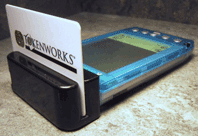
This semester has been a mag-stripe reading adventure for the administration at Kutztown University in southeastern Pennsylvania. Springing from a regulation to halt non-students (e.g. recent graduates, drop-outs) from using the bus, the university decided to invest in six handheld ID card readers in an attempt to better monitor ridership. In the process of implementing the PDAs with magnetic stripe readers from Tokenworks, the University gained even more than they had hoped.
 Kutztown has approximately 4,500 residents and is located an hour and a half from Philadelphia and two hours from New York City. Currently, some 8,200 students are enrolled at the university from 20 states and 40 countries.
Tokenworks’ card readers are helping administration tremendously as they strive to understand a number of ridership issues. “It shows us which route has the most traffic and where we need to open another stop for the shuttle … or if we should have another bus altogether,” says Max Keiper, Kutztown’s Info Tech Technician.
Prior to the installation in the three shuttle buses earlier this fall, the policy to ride was to simply flash your student ID, making it uncomplicated for graduates and drop-outs to ride. Now that the student must swipe their card in the card reader, “it helps to let students know who can ride the bus and who cannot, and what they would have to do to get permission to ride,” said Keiper.
The card readers have also enabled the discovering of which bus stop has the most traffic at certain times of the day. Mr. Keiper points out, “it gives us an idea as to which class levels are using it, what times they are riding, and from a security standpoint, if anything were to happen, who was on the bus.”
The package that Kutztown is using in their busses is the DBDeluxe package from Tokenworks. It includes Tokenworks’ CardTool Reader, CardDB Software, a Handspring Visor PDA and a number of other items. “The card readers are updated to the latest version: 3.30. We are using CardScribe and CardDB Database Applications installed on the handheld,” said Max Keiper.
Kutztown says a number of schools have contacted them about their usage of the card readers, and the University of Toledo has already gone through with the installation. “We continue to see strong demand from the higher education market as new customers see the CardDB solution used by existing customers” says Charles Cagliostro, President of Tokenworks.
When asked if he was looking to purchase more card readers for the same or other applications, Mr. Keiper replied, “Yes, there are a lot of possibilities for these readers. I am happy with them, and with the service.”
TokenWorks has provided smart card, magnetic card and other token based solutions to system integrators and operators since 1998. The company’s co-founders have more than twenty years combined experience in electrical design and the ID card industry.
Additional Resources:
More and more campuses are offering payment card functionality with their campus card program. Students enjoy the flexibility of using the card for payment at both on and off campus locations just as they would any other bank-issued card. But while virtually all of the payment options are debit products, there are major differences between debit products. To understand the options available to your card program, an understanding of the debit card landscape is essential.
An easy way to distinguish debit cards from other payment tools is to think of the payment or repayment cycles. With credit cards, the cardholder “pays later.” With stored value cards the cardholder “pays before.” And with debit products you “pay now.”
Although all debit cards fit the “pay now” category, there are key differences. The two major types of debit cards are known by a variety of different names but the easiest way to keep it straight is that one type is authorized by a personal identification number (PIN) while the other is authorized by the customer’s signature. This difference led to one of the commonly used terms for the two types: PIN-based debit and Signature-based debit.
Though it is sometimes hard to imagine that we survived without debit cards, there was a day when we paid for nearly all of our non-cash/non-credit purchases with paper checks. When the ATM networks proliferated, it seemed a logical extension to enable the ATM card’s use at the point of sale.
These cards drew directly against a customer’s bank account and had very little likelihood of overdraft. Additionally, an electronic transaction was far less expensive to process than a paper check. Because the systems required PIN authorization, PIN pads were required at the point of sale. Because of this added expense, grocery stores were among the first to adopt PIN-based debit as their transactions were higher dollar value and very heavily dominated by paper checks.
Most of the regional ATM networks offered PIN-based debit. Names like NYCE, Interlink, Cirrus, Honor, MAC, CashStation, Pulse, and others could be found on the backs of ATM cards across the country. Consolidation and acquisition has left only a few major players in the PIN-based debit world. As an example, Concord EFS owns and operates the largest network, STAR, that has absorbed older players like Honor, CashStation, and MAC.
PIN-based debit is also referred to as online debit, and in some cases, electronic funds transfers (EFT). With these systems the customer’s account is debited immediately following the transaction. Merchants typically pay a flat fee for the transaction regardless of the dollar value.
The other debit alternative evolved, not from the ATM cards and networks, but from the credit card world. MasterCard and Visa dominate the signature-based debit market capitalizing on the deployed base of merchant acquirers, terminals, and transaction processing networks used for credit transactions.
Though signature-based debit products do not rely on ATM networks for typical debit transactions, they do offer ATM card functionality. Virtually every one of these cards offers ATM access via PIN to complement the debit functionality via signature.
Signature-based debit is often referred to as offline debit. Transactions do not debit the customer’s account immediately as they do in online debit, but typically within 24 to 48 hours. Merchants pay a discount fee (a percentage of the transaction’s dollar value) as they would for credit card usage for the privilege of accepting the card.
Perhaps the best way to encapsulate the discussion is with this paragraph from the Federal Reserve Bank of Kansas City’s document, Guide to the ATM and Debit Card Industry:
“To complete this section, it may be useful to emphasize the similarities and differences between online and offline debit transactions. Both transactions are conducted at a POS terminal. Both represent payments in exchange for goods or services. But online debit requires the use of a PIN and funds are debited immediately, while offline debit does not require a PIN and funds are not debited immediately. Online debit transactions are processed over an EFT network. By contrast, offline debit transactions are processed over credit card networks. Online debit allows the consumer to obtain cash back at the point of sale, while offline debit does not. Finally, consumers and merchants face differing fees for online and offline debit.”